


TL;DR: How to perform an SEO audit
To perform an SEO audit, you need to evaluate your website’s technical health, user experience, content relevance, and authority using Google Search Console, Screaming Frog, and other SEO tools.
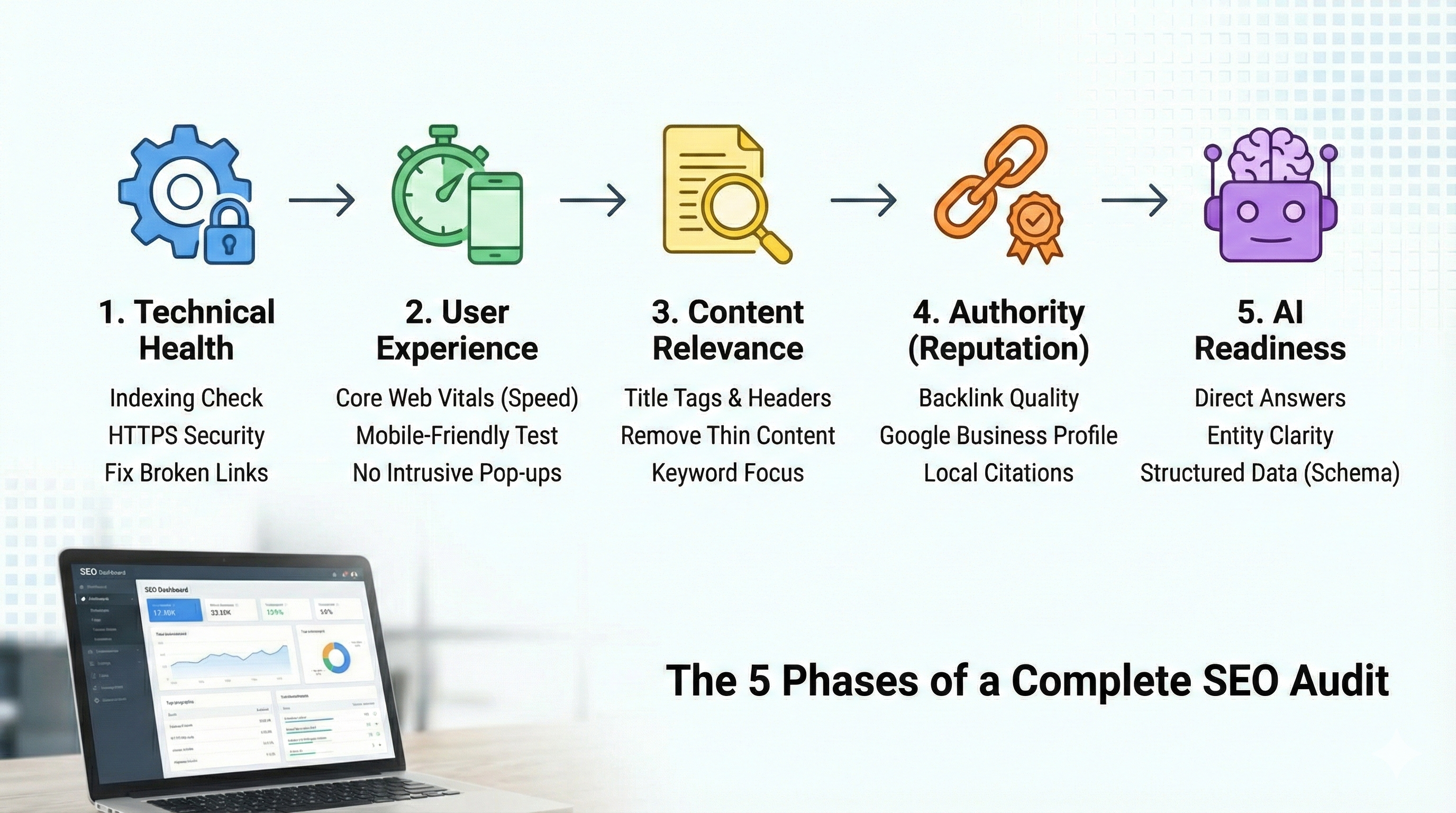
To get the best results, focus your SEO audit on these five pillars:
-
The goal: Treat your audit like an NCT for your website. You are looking for technical "brakes", like slow speeds or broken links, that stop you from gaining momentum.
-
The toolkit: Expensive SEO software isn't mandatory. Start with free tools: Google Search Console for indexing issues, Screaming Frog for finding broken links, and Google PageSpeed Insights for performance checks.
-
Phase 1 - Technical: Verify that Google can access your site. Check for "noindex" tags blocking visibility, ensure your SSL certificate (HTTPS) is valid, and fix any 404 error pages.
-
Phase 2 - Experience: Test your Core Web Vitals. Your site should load in under 2.5 seconds and work seamlessly on mobile devices without requiring users to pinch and zoom.
-
Phase 3 - Content: Audit your pages for clarity and relevance. Ensure every URL has a unique Title Tag and H1 header, and remove "thin" or duplicate pages that offer no value to the user.
-
Phase 4 - Authority: Review your Google Business Profile for accuracy and scan your backlink profile to ensure only reputable local sites are linking to you.
-
Phase 5 - AI readiness: Audit your content for "direct answers." Ensure you explicitly answer user questions early in your text so AI models like ChatGPT and Gemini can understand and cite you as an expert in your field.
How to perform an SEO audit step by step
You built a website. It looks great. You launched it and waited for the enquiries to roll in.
But right now? Silence.
It’s the most common frustration I hear from business owners across Ireland. You know your service is good, but your website just isn’t getting the traffic it deserves.
Often, the problem isn’t your product or even your website content. It’s what’s happening "under the bonnet."
If you want to rank well in search results and be cited by AI answer engines, you can't just cross your fingers. Google’s standards for speed, usability, and technical quality are higher than ever. That's why you need an SEO audit.
This guide isn’t about drowning you in jargon or making you feel bad about your current site. It’s a practical walkthrough to help you find the hidden "brakes" that are slowing your business down and show you exactly how to release them.
What is an SEO audit, really?
Think of an SEO audit like the NCT for your website.
You wouldn’t drive a car for five years without checking the engine, tires, or brakes. An SEO audit is the same concept. It’s a health check that looks at your website from Google's perspective to answer three simple questions:
-
Can Google find you? (Check your website's technical health)
-
Does Google understand you? (Check your content quality and relevance)
-
Do users actually like you? (Check your page peed and user experience)
If the answer to any of these is "no," it doesn't matter how nice your homepage looks, you won't rank.
Why this matters for your bottom line
I often see Irish businesses spending a fortune on paid ads or social media, while their main website is leaking traffic due to technical errors.
Fixing these issues is often the best work you can do to boost your traffic and leads. I’ve seen small tweaks, like fixing broken links or improving the speed of your pages on mobile, result in a 20% or 30% jump in traffic within weeks.
Ready to see what’s holding your site back? Let’s open the bonnet.
The toolkit (what you actually need)
There is a misconception that you need to spend hundreds of Euro a month on expensive software to audit a website. You don’t.
While enterprise SEO tools like Semrush or Ahrefs are brilliant (I use them daily for my clients), you can uncover 80% of the problems on your site using free tools directly from Google and a few plugins.
To get the job done, start with this simple toolkit.
1. Essential free tools
-
Google Search Console (GSC): If you only use one tool, make it this one. It is the only place where Google explicitly tells you, "Here is what is broken on your site." It shows you indexing errors, security issues, and exactly which keywords are driving traffic.
-
Screaming Frog SEO Spider: This is an industry standard. It’s a desktop program that "crawls" your website just like Google does. The free version lets you scan up to 500 URLs, which is perfect for most small business websites. It spots broken links, missing title tags, and large images in seconds.
-
Google Analytics 4 (GA4): While GSC tells you how people find you, GA4 tells you what they do after they arrive. It shows you pages where users land and immediately leave (high bounce/engagement rate issues).
2. Browser extensions
Save yourself time by installing these Chrome extensions. They let you check a page’s health in one click:
-
Detailed SEO Extension: Shows you title tags, headers, and meta descriptions instantly without needing to view the source code.
-
Lighthouse: Built into Chrome, this gives you a snapshot of your "Core Web Vitals" (page speed and performance).
3. Paid tools
If you have a larger budget or want to spy on your competitors, consider using Semrush, Ahrefs, or Moz.
They are excellent for:
-
Keyword research (finding what your customers search for).
-
Competitor analysis (seeing where your rivals get their links).
-
Rank tracking (monitoring your position in Google Ireland).
Pro Tip: Most of these paid tools offer a 7-day free trial. If you are doing a one-off DIY audit, sign up for a trial, run your reports, export the data, and then cancel before you get charged.
Phase 1: Technical health
We start here for one simple reason: if Google cannot access your website, nothing else matters.
You could have the best blog posts in the world, but if a technical issue is stopping search engines from reading them, you won't rank. Your website's technical health is the foundation and this phase is about ensuring the doors are open and the lights are on.
1. Indexing: Is Google listing you?
"Indexing" is just fancy talk for "being filed in Google's library." If a page isn't indexed, it doesn't exist in search results.
Go to Google and type site:yourdomain.ie into the search bar (replace yourdomain.ie with your actual website).
You want to see list of your main pages (Home, Services, About, Contact).
If you see "0 results," your site is blocking Google entirely. If you see hundreds of junk pages you didn't create, you might have been hacked or have a CMS issue.
Log into Google Search Console and look at the "Pages" report. Look for the grey "Not Indexed" bar. Don't panic if you see numbers here. Google often chooses not to index pages like feed URLs or cart pages. If your service pages or other important pages are listed as "Crawled - currently not indexed," that is a red flag that requires attention.
2. HTTPS: Verify your security settings
Years ago, having that little padlock icon (HTTPS) next to your URL was a nice bonus. Today, it is non-negotiable.
If your site still loads as http:// instead of https://, Chrome will label your site as "Not Secure" to visitors. For an Irish customer thinking about entering their credit card or email details, that warning is usually enough to make them hit the back button.
How to check: Type your website address into a browser using http:// (e.g., http://www.yoursite.ie). It should automatically flip you over to the secure https:// version. If it doesn't, you need to contact your hosting provider to set up a "301 redirect."
3. Canonicalisation: The "one website" rule
This is a technical quirk that trips up many small business owners in Ireland. To a human, yoursite.ie and www.yoursite.ie are the same place. To a search engine, they are two different websites.
If both versions load separately, Google might split your ranking power between them, or view them as duplicate content.
Type all four versions of your address into your browser (http vs https, and www vs non-www):
-
http://yoursite.ie -
http://www.yoursite.ie -
https://yoursite.ie -
https://www.yoursite.ie
All four should automatically snap to one single version (usually the secure https version). If they don't, you have a canonicalisation issue.
4. 404s: Find broken links
Nothing kills user trust faster than clicking a link and hitting a "Page Not Found" error. It tells the user (and Google) that the site is neglected.
Run a crawl of your site with Screaming Frog and look at the "Response Codes" tab. Filter for "Client Error (4xx)".
-
Internal 404s: These are links on your site pointing to broken pages on your site. Fix these immediately by updating the link or redirecting the broken page to a relevant working one.
-
External 404s: These are links on your site pointing to other people's broken sites. Remove or replace them.
Pro Tip: Do not just redirect every broken page to your Homepage. That confuses users and kills the SEO value you've built over time. If you delete a page about "Blue Widgets," redirect it to the "Widgets" category page, not the front door.
Phase 2: User experience
You can have the most secure, perfectly indexed website in the world, but if it takes ten seconds to load on a mobile phone, you have already lost the customer.
Google cares about this because users care about this. That is why they introduced Core Web Vitals, a set of specific metrics that measure how annoying (or delightful) your website is to use.
Passing these tests isn't just about "good practice"; it is a ranking factor.
1. Speed & Core Web Vitals (the 3-second rule)
We used to just talk about "site speed." Now, we need to be a bit more specific. You don’t need to be a developer to understand these three acronyms, but you do need to know if you are failing them.
-
LCP (Largest Contentful Paint): How fast does the main part of the page load?
-
When a user clicks your link, how long do they stare at a white screen before they see your headline or hero image? If it’s more than 2.5 seconds, you need to fix it.
-
-
INP (Interaction to Next Paint): How quickly does the site react?
-
When a user clicks "Add to Cart" or opens your menu, does the site freeze for a second, or does it respond instantly? Laggy buttons frustrate users.
-
-
CLS (Cumulative Layout Shift): Does the layout jump around?
-
Have you ever tried to click a button, but suddenly an image loads above it, pushing the button down, and you click an ad by mistake? That is a layout shift. Google hates this.
-
Go to Google PageSpeed Insights and paste your URL. Focus on the "Core Web Vitals Assessment" (Pass/Fail) at the top. Don't obsess over getting a perfect 100/100 score on the performance dial. It’s often a vanity metric. Your goal is to get a "Pass" on the Core Web Vitals field data.
2. The mobile "thumb test"
In Ireland, over 60% of web traffic comes from mobile devices. If you are a local business, like a restaurant, plumber, or shop, that number is likely closer to 80% or 90%.
A site can be "responsive" (meaning it shrinks to fit the screen) but still be terrible to use.
Don't just rely on one tool. Take out your phone, disconnect from WiFi (use 4G/5G to simulate a real customer on the move), and try to use your site.
-
Are the buttons too close together? (Can you tap 'Menu' without hitting 'Search'?)
-
Is the text readable without pinching and zooming?
-
Do pop-ups cover the whole screen? (Google penalises "intrusive interstitials" that block content on mobile).
3. Bounce rate vs. engagement rate
While Google says they don't use Google Analytics data for ranking, high bounce rates usually point to a problem that does affect ranking: irrelevant content or bad UX.
Look at GA4 (Google Analytics 4). Forget "Bounce Rate" (which is less useful now) and look at "Engagement Rate."
-
If a specific page has a very low engagement rate (e.g., under 30%), users are landing there and leaving immediately.
-
Ask yourself: Does the headline match what they searched for? Is the page broken? Is the intro boring?
Pro Tip: Large images are the #1 silent killer of site speed. I often see small business owners uploading 5MB raw photos from their iPhone directly to their website. That is huge. Use a free tool like TinyJPG or Squoosh to compress images before you upload them. It’s the single fastest way to speed up a site.
Phase 3: Content relevance
Technical SEO gets you to the starting line, but content is what gets you across the finish line.
When Google scans your page, it is looking for context. It wants to know exactly what you do, where you do it, and who you do it for. If your content is vague, your rankings will be too.
This phase of the SEO audit checks if your pages are sending the right signals.
1. Title tags & meta descriptions
Your Title Tag is the blue clickable headline that appears in Google search results. It is arguably the single most important on-page SEO factor.
I see so many homepages in Ireland with the title: "Home - Welcome to [Business Name]". This is a wasted opportunity. Nobody searches for "Home." They search for "Emergency Plumber Cork" or "Wedding Cake Maker Dublin."
Use the Detailed SEO Extension or hover your mouse over the tab in your browser.
-
Title Tag: Does it include your main service and location? (e.g., "Digital Marketing Consultant Dublin | Hello Digital")
-
Meta Description: This is the short paragraph under the title. It doesn't directly affect rankings, but it sells the click. Does yours sound enticing, or is it just AI-generated slop?
2. Header structure
Search engines (and users) don't read every single word on your page - they skim. They use Headings (H1, H2, H3) to understand the hierarchy of your information.
Follow these rules:
-
One H1 per page: This should be your main headline. It must describe what the page is about.
-
Logical H2s and H3s: Use these to break up text.
-
Avoid "empty" headers: Don't use H2s for generic text like "Read More" or "Contact Us." Use them for keywords like "Our Pricing" or "Why Choose Us."
Open a page and use your browser extension to view the "Headers" list. If the hierarchy looks like a jumbled mess (e.g., an H4 appearing before an H1), fix the structure.
3. Thin & duplicate content
Content quality matters more than quantity. Google creates "helpful content" updates specifically to downgrade sites that publish fluff.
-
Thin Content: Pages with only one or two sentences. These tell Google you don't have much to say. If a page isn't useful, either beef it up or delete it.
-
Duplicate Content: Do you have three different pages for "Plumber Swords," "Plumber Malahide," and "Plumber Howth" where the text is identical except for the town name? Google ignores these cookie-cutter pages.
In Screaming Frog, look for pages with a "Word Count" below 300 words. Review them manually. Are they necessary? If not, prune them.
4. Keyword cannibalisation
This sounds dramatic, but it’s a simple concept: You have two different pages trying to rank for the exact same keyword. In other words, you're competing with yourself.
For example, if you have a "Services" page about SEO and a "Blog Post" about SEO services, Google might not know which one to rank. Often, it ends up ranking neither.
Go to Google Search Console > Performance. Filter by a specific query (e.g., "SEO Audit"). Click on the "Pages" tab below the graph. If you see two or more pages getting impressions for the same query, you might be cannibalising your own traffic. Consider merging those two pages into one master guide about that topic.
Pro Tip: Don't write for robots. Read your content out loud. If it sounds stiff, awkward, or stuffed with keywords like "best pizza Dublin cheap pizza Dublin tasty pizza," rewrite it. If a human thinks it sounds spammy, an AI search engine will definitely think it’s spammy.
Phase 4: Authority (reputation)
You can have a fast, technically perfect website with great content, but if nobody links to it, Google might still ignore you.
Why? Because Google views links from other websites as votes of confidence.
If the Irish Times or a local Chamber of Commerce links to your site, it tells Google: "These guys are legitimate." If nobody links to you — or worse, only spammy gambling sites link to you — Google assumes you are irrelevant or untrustworthy.
This phase of the audit checks your online reputation.
1. Backlink profile
You don’t need thousands of links. You just need the right links.
Open Google Search Console and scroll down to the "Links" report. Look at "Top linking sites."
-
Do you see suppliers, partners, local business directories (like Golden Pages or local enterprise boards), or news sites? These are healthy votes.
-
Do you see weird domains (often in a foreign language) or directory farms? A few are normal, but if you have thousands of them, you might have a problem. Toxic links need cleaning up.
2. Local SEO & Google Business Profile
For most Irish businesses, your biggest competitor isn't Amazon; it's the guy down the road. Local SEO is how you beat him.
Your Google Business Profile (GBP) is that box that appears on the right side of search results with your map location and reviews. It is arguably more important than your homepage for local queries like "Cafe near me" or "Solicitor in Galway."
Google your business name.
-
Is your profile claimed? If it says "Own this business?", claim it immediately.
-
Are the details accurate? Check your NAP (Name, Address, Phone). It must be identical to what is on your website footer. If your site says "St. Patrick's St" and Google Maps says "Saint Patrick's Street," it can confuse the algorithm.
-
Categories: Are you listed as just a "Store," or specifically a "Shoe Store"? Be specific.
3. E-E-A-T (Expertise, Experience, Authoritativeness, and Trustworthiness)
With the rise of AI-generated content, Google is doubling down on E-E-A-T (Experience, Expertise, Authoritativeness, and Trustworthiness). They want to know there are real humans behind the website.
Typical E-E-A-T signals include:
-
The "About" Page: Does your site have one? Does it feature real photos of you and your team, or just generic stock photos of people shaking hands?
-
Contact Details: Is your physical address and phone number visible? Sites that hide behind a generic "contact@domain.com" with no address look suspicious to search engines.
-
Author Bios: If you have a blog, does it say "Written by Admin"? Change that. Give yourself a byline. "Written by Mary Murphy, Chartered Accountant" carries more weight than "Admin."
Pro Tip: Reviews are ranking fuel. Don’t be shy about asking happy clients for a Google Review. My strategy? Send a personal email (not an automated one) on a Friday morning. People are generally in a good mood and have a moment to spare before the weekend. A steady stream of 5-star reviews is one of the best trust signals you can send to Google.
Phase 5: AI readiness
We can't talk about SEO today without talking about AI.
Your customers aren't just typing keywords into Google; they are asking questions to ChatGPT, Perplexity, or Google’s AI Overviews.
These AI answer engines don't just give a list of links. They read your content, understand it, and synthesise an answer. The goal of this phase is simple: Make it easy for AI to read your content so it cites you as the expert in your field.
If an AI can't understand your answer, it won't feature you.
1. The "direct answer" test
AI models love the "Inverted Pyramid" writing style. When you ask a question, they look for a direct, concise answer first, followed by the details.
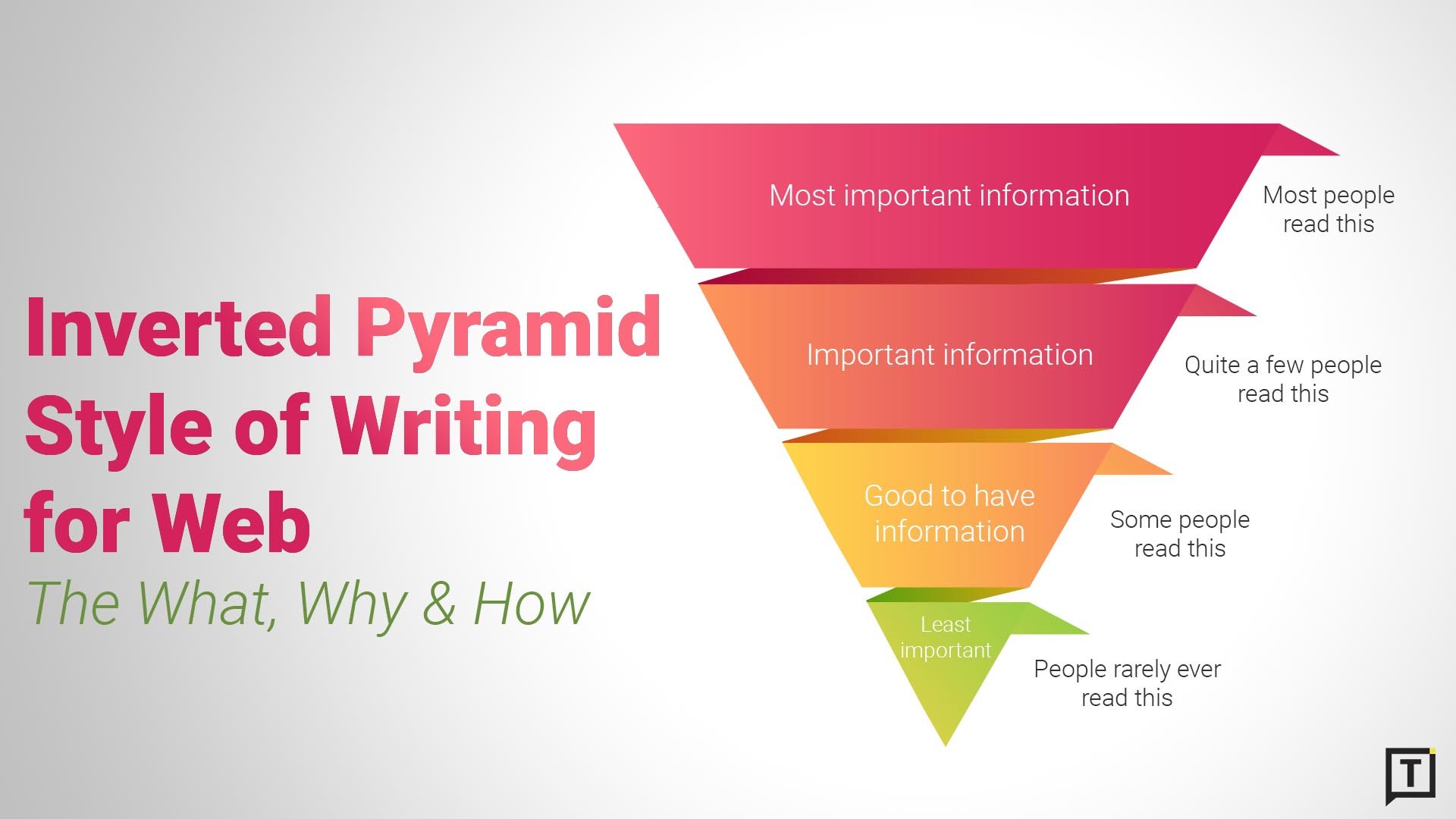
Source: Typewriter.
Writing a blog post titled "How much does a plumber cost in Dublin?" and spending the first 500 words talking about the history of plumbing before finally revealing the price at the bottom. An AI might skip this entirely.
Look at your blog posts or FAQ pages. Find your main H2 headers (e.g., "What is the average cost of SEO?"). Read the very next sentence.
-
Does it give a direct answer (e.g., "The average cost of SEO in Ireland ranges from €500 to €2,000 per month.")?
-
Does it waffle (e.g., "Many factors influence the cost, and it is important to consider...")?
2. The "who are wou?" test
AI relies heavily on "Entities" to understand exactly who you are and what you do. If ChatGPT thinks your business is a coffee shop when you are actually a digital marketing consultancy, you have an entity problem.
Go to ChatGPT or Gemini and ask: "Who is [Your Business Name] in [Your Location] and what do they do?"
-
If it answers correctly: Great. Your "About" page, schema markup, and digital footprint are clear.
-
If it says "I don't know": You need to strengthen your "About Us" page. Add details about your history, services, and location. Ensure your social media profiles all use the exact same description.
3. Structure your data for AI search engines
AI models prefer structured lists over walls of text. They use these lists to generate their own bullet points in search results.
Review your service pages. Are you using bullet points and numbered lists to explain processes?
-
Bad: A generic paragraph listing your services separated by commas.
-
Good: A bullet point list using
<ul>or<ol>HTML tags.
Pro Tip: Schema Markup pays off double. Schema is essentially "native language" for AI search engines. When you mark up your FAQs, Reviews, and Services with Schema, you are literally handing the AI the answers on a plate.
Turning data into action
Running an SEO audit can be a little terrifying.
You open up Screaming Frog or Semrush, and suddenly you are staring at 400 "Warnings," 50 "Errors," and a health score that looks like a failing grade.
Don't panic. SEO software tools can be hyper-sensitive. They will flag a missing image description with the same urgency as a broken server.
The goal of your SEO audit isn't fixing every single issue; it is fixing the right issues first.
The "triage" strategy
If you have limited time (and as a business owner, you definitely do), prioritise your fixes in this order. This is the exact hierarchy I use when auditing client sites:
-
The "blockers" (immediate fix): Start with Phase 1. If your site isn't indexed, is getting hacked, or is throwing 404 errors on key pages, nothing else matters. Fix these today.
-
The "quick wins" (high impact, low effort): Look for easy content tweaks. updating a Title Tag to include a local keyword (e.g., adding "Dublin") takes 30 seconds but can boost your click-through rate tomorrow.
-
The "projects" (long-term work): Improving Core Web Vitals (speed) or building backlinks takes time. Put these on a roadmap. Work on them for an hour a week, not all at once.
SEO is a habit, not an event
A website is a living thing. You add new products, you delete old blog posts, plugins update and break things.
Don't let this be the only time you look "under the bonnet." Set a reminder to run a quick crawl of your site once a quarter. It’s much easier to fix five broken links today than 500 broken links next year.
Frequently asked questions about SEO audits
How often should I perform an SEO audit?
For most small Irish businesses, a full SEO audit once a year is enough. You should run a quick technical health check with Screaming Frog every quarter. Websites break more often than people think. Plugins update, pages get deleted, and images get moved. Regular checks catch these issues before they hurt your rankings.
Can I do an SEO audit for free?
Yes. You can uncover about 80% of critical issues using free tools. Google Search Console is your most valuable asset here because the data comes directly from the source. The free version of Screaming Frog (limited to 500 URLs) is also plenty for most small business websites. You generally only need paid tools for advanced competitive analysis or tracking large keyword lists.
Do I need to know how to code to audit my site?
No. You don't need to be a developer to find the problems, you only need to know how to identify them. Many fixes (like updating title tags, compressing images, or rewriting content) can be done via your CMS (like WordPress or Shopify). For technical fixes like server speed or heavy coding issues, you might need a developer's help, but the audit gives you a to-do list to hand them.
What is the most common SEO mistake you see on Irish websites?
Two things usually stand out. First, huge images. Irish business owners often upload photos directly from their phones. These high-resolution images kill site speed. Second, generic title tags. Too many sites just have "Home" or "Services" as their page titles, missing a huge opportunity to tell Google exactly what they do and where they are located (e.g., "Home Renovation Architects Dublin").
Does this audit cover AI Search (ChatGPT/Gemini)?
Standard SEO audits focus on Google's traditional algorithms, but SEO and AI search principles overlap. Phase 5 of this guide covers "AI Readiness." The key takeaway is that if your content is clear, well-structured, and technically accessible to Google's crawler, it is also accessible to AI models. Fixing your technical SEO is the best foundation for AI visibility.