

AI SEO


Last updated: 21 July 2026
You can do many SEO tasks yourself, but the order in which you do them matters.
One of the most common problems I find when reviewing small business websites in Ireland is not a complete lack of SEO. It is a collection of disconnected actions: keywords have been added to pages, several articles have been published and an SEO plugin has been installed, but nobody has confirmed which pages should rank, whether Google can index them or whether the SEO work supports the commercial priorities of the business.
Rather than listing every SEO task you could complete, this guide sets out the process I recommend for an Irish small business that wants to improve its own website without wasting time, damaging existing visibility or relying entirely on SEO software.
The main steps are:
Record your current position.
Check that Google can access and index your website.
Decide which parts of your business matter most.
Research how your customers search.
Assign each search topic to the right page.
Optimise your most important existing pages.
Create content that is helpful and adds value.
Improve the website structure and internal links.
Fix important technical and mobile usability problems.
Strengthen your local visibility.
Build authority in your niche through links and mentions.
Measure the results and decide what to improve next.
Yes. Many small business owners in Ireland can manage parts of their SEO without hiring a consultant or agency.
You do not need advanced technical knowledge to improve page titles, update content, add internal links, answer customer questions or monitor basic SEO performance in Google Search Console.
The more important question to ask is not simply whether you can do a task. It is whether you can complete it safely, whether it is a good use of your time and whether the decision could affect the rest of the website.
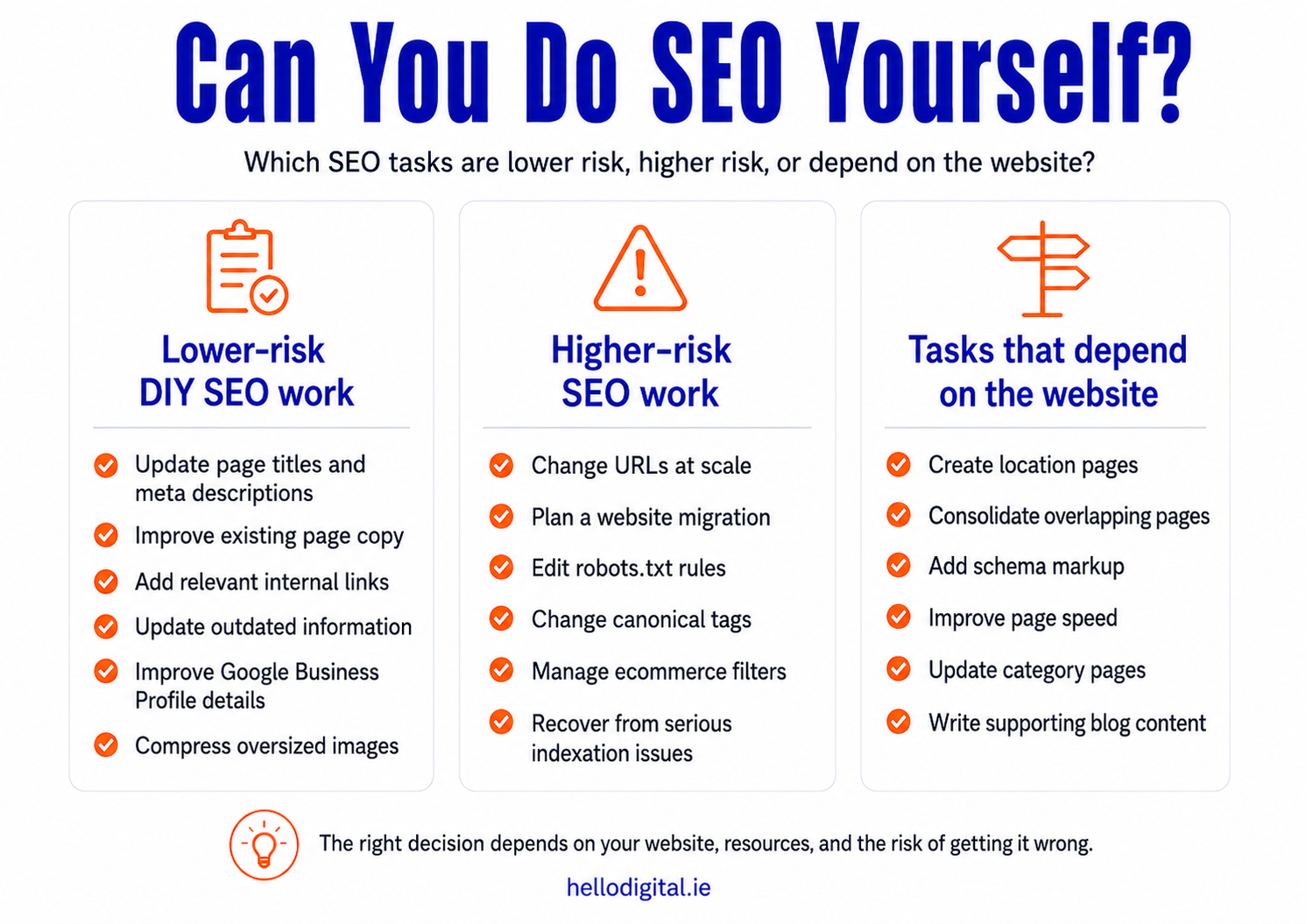
These are lower-risk tasks for most small businesses:
Updating inaccurate or outdated page content
Writing unique title tags and meta descriptions for each page
Linking related pages so visitors and Google can find important content more easily
Writing content for your service pages, product pages and articles
Keeping your business name, address, phone number, opening hours and contact details accurate and up to date
Completing your Google Business Profile with the right category, services, photos and booking links
Checking which pages and searches are getting impressions and clicks in Google Search Console
Adding FAQs, case studies, and testimonials
Compressing oversized images
Fixing broken links
These tasks carry more risk:
Changing many page URLs at once
Moving the website to a new platform, domain or structure
Editing robots.txt rules that control what search engines can crawl
Changing canonical tags that tell Google which page version to index
Deciding which pages or sections should be excluded from search results
Controlling ecommerce filters that create large numbers of extra URLs
Finding out why many pages have disappeared from Google’s index
Fixing important content that Google cannot access because of JavaScript
Merging or removing large numbers of overlapping pages
Recovering from a Google manual action or a serious technical SEO mistake
A task can be easy to describe but risky to implement. Changing a URL takes seconds. Preserving its rankings, links, analytics history and internal connections requires more care.
DIY SEO works best when you handle the tasks that match your knowledge and resources, then get help where the cost of a mistake is higher.
A structured SEO audit can help separate the issues affecting visibility from the changes that are unlikely to make a difference.
Before rewriting pages, publishing new content, changing URLs or making technical SEO changes, record how the website is performing in organic search.
This gives you a point of comparison. Without it, you may see traffic or rankings change without knowing whether the cause was your work, seasonality, a website issue or something else.
First, confirm that the following tracking is in place:
Google Search Console
Google Analytics or another analytics platform
Enquiry, booking, sales and call tracking
Rank tracking for a small number of important searches
Then record:
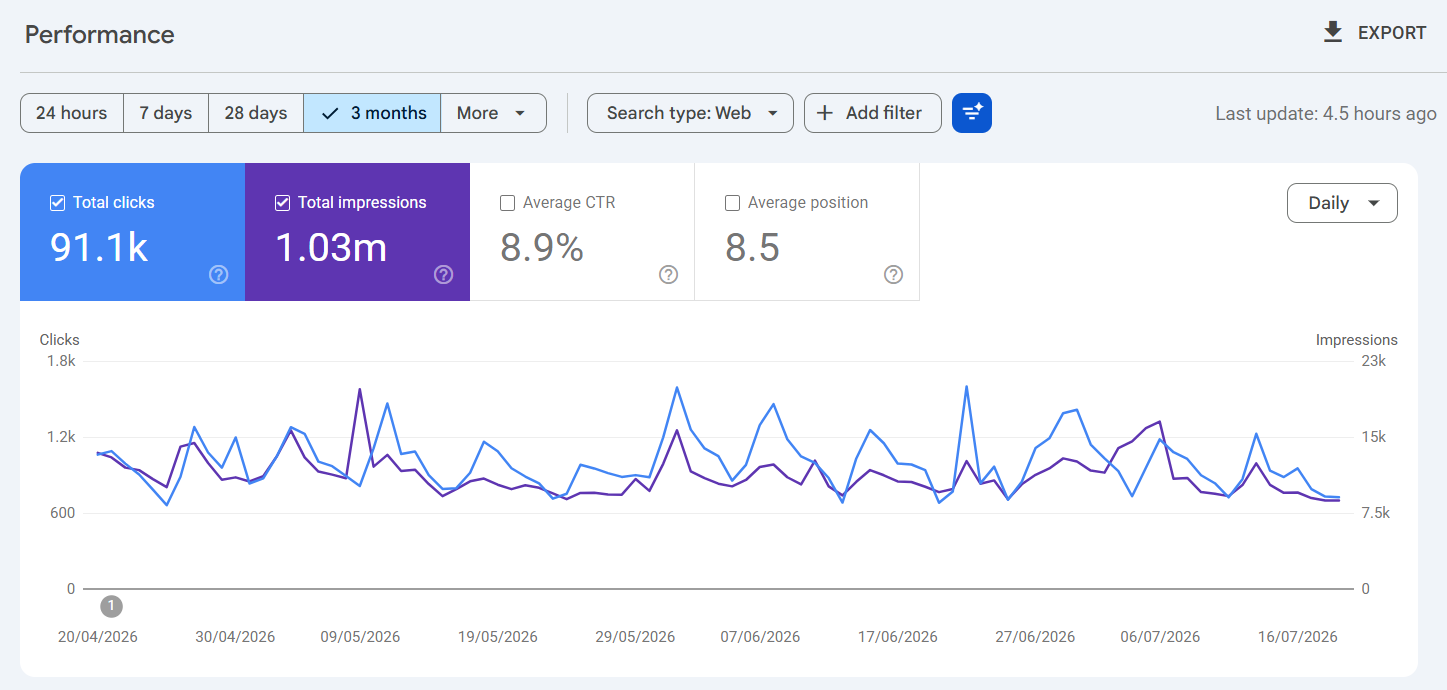
Organic clicks and impressions during the previous three months
Enquiries, bookings or sales generated through organic search
The pages receiving the most organic visits
The non-branded searches generating impressions and clicks
The important service, product or category pages receiving little or no visibility
Which important pages are indexed
Any pages Google has excluded from its index
Current rankings for the searches that matter most to the business
Any known crawling, mobile or page-performance problems
Use the same date range when reviewing the results later. Where the business is seasonal, compare performance with the same period in the previous year as well as the previous three months.
Google Search Console shows which searches and pages are generating impressions and clicks. Its indexing reports can also help identify pages Google cannot crawl, has chosen not to index or has indexed under a different canonical URL.
Google Analytics and your enquiry or sales tracking show what happens after someone reaches the website. This is important because an increase in traffic does not necessarily lead to more enquiries or sales.
Google Search Console's Performance report:
A physiotherapy clinic may find that its homepage receives most of its organic traffic, while its pages for sports injuries, back pain and post-operative rehabilitation receive very few impressions.
That does not immediately mean the service pages need to be rewritten. The baseline shows what should be checked next:
Are the pages indexed?
Are they targeting searches patients use?
Are other pages competing for the same searches?
Are the service pages linked from the main navigation and content sections?
Do they explain the treatment, the practitioner’s experience and how to book?
Are they receiving visibility but failing to generate clicks?
The purpose of the baseline is to replace a broad objective such as “improve our SEO” with specific problems that can be investigated and measured.
Before improving page titles, headings or content, check that Google can find and index the pages you want people to discover.
Google needs to discover a page, crawl its content and decide to add it to its index before the page can appear properly in search results. An XML sitemap can help Google find important URLs, but submitting one does not guarantee that every page will be indexed.
Start with the pages most important to the business:
Homepage
Main service or product pages
Product and service categories
Important location pages
Contact, booking or enquiry pages
Articles and guides that support important services or products
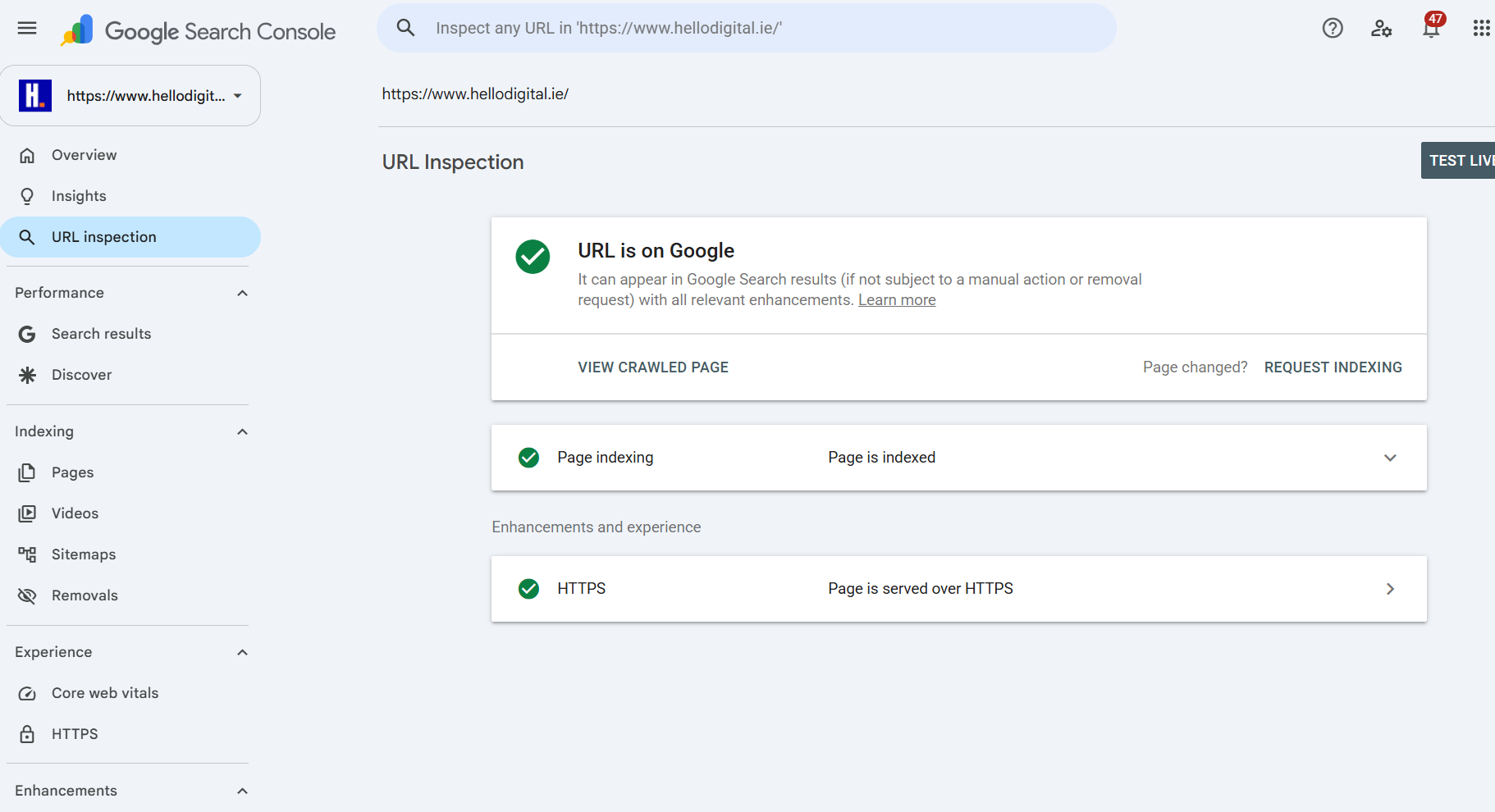
Use the URL Inspection tool in Google Search Console to check each page.
Confirm:
Whether the page is indexed
When Google last crawled it
Whether crawling is allowed
Whether the page contains a noindex instruction
Which canonical URL the website declares
Which canonical URL Google selected
If Google selected a different canonical URL, check whether another page contains substantially the same content or whether the canonical tag points to the wrong address.
You should also check that:
Important pages are not blocked from crawling in robots.txt
Pages return a 200 OK response rather than a 404, 500 or other error
Canonical tags point to the correct version of each page
The website consistently uses HTTPS and one preferred domain version
The XML sitemap contains only indexable, canonical URLs
Important pages can be reached through the navigation or internal links
Redirects lead directly to the final URL rather than passing through several other redirects
Do not assume the whole website is set up correctly because the homepage appears in Google.
Indexing problems can affect one page template, product category, blog section or group of location pages while the rest of the website continues to appear normally.
Google Search Console's URL inspection tool:
Get technical help if:
A large number of important pages disappear from Google
Search Console reports repeated server errors
Google selects the wrong canonical URL across many pages
Important content is loaded through JavaScript and Google cannot access it reliably
A website redesign, platform change or domain migration is planned
Ecommerce filters create thousands of crawlable URLs
Pages remain unindexed and the reason is not clear
Changes to robots.txt, canonical tags or noindex rules are required across the website
These problems affect how Google crawls and indexes the site. Rewriting the content or adding more keywords will not resolve them.
Before researching keywords, decide which products, services and customers the SEO work should support.
Otherwise, it is easy to build a keyword list around popular searches that attract traffic but do not lead to the type of enquiries or sales the business wants.
Identify:
The products or services you want to generate more business for
The customers you most want to reach
The locations you serve
The services that are most profitable or have capacity for more work
The pages that should generate enquiries, bookings or sales
What counts as a conversion, such as a call, form submission, booking or purchase
The subjects where you can provide genuine experience, evidence or advice
Then turn this into a short list of priorities.
For each priority product or service, record:
The page that should represent it
The customer it is aimed at
The location it serves
The action you want the visitor to take
The reason it matters to the business
This gives the keyword research a purpose. Instead of asking only which searches have the highest volume, you can assess whether a search makes sense for the work the business wants to attract.
A tax advisory firm may find higher reported search volumes for broad questions such as “what is income tax?” or “how much tax do I pay?”
Those searches may attract visitors, but they may have little connection to the services the firm wants to grow.
Its priorities could instead include:
Advising business owners who are preparing to sell a company
Company restructuring
Business succession planning
Corporate tax advice
Revenue audits
Tax advice for Irish company directors
These searches may show lower volumes, particularly in Ireland, but an enquiry could be worth considerably more to the firm.
Search volume helps estimate demand. It does not tell you which services the business should prioritise.
Once you know which products, services and customers matter most, identify the words people use when searching for them.
Do not rely only on the terminology used inside the business. Customers may describe the same service, product or problem differently.
Start with information the business already has:
Questions customers ask during calls
Words used in enquiry forms and emails
Feedback from sales and customer service teams
Searches already appearing in Google Search Console
Product or service terms customers use
Common misunderstandings about the service
Problems customers are trying to solve
Locations and area names customers mention
For each priority product or service, write down:
The main service or product name
Common alternative terms
The problem or need behind the search
Questions customers ask before making a decision
Location terms
Words that suggest the person is ready to enquire, book or buy
Then use keyword tools and Google search results to expand and check the list.
Useful sources include:
Google Search Console
Google Keyword Planner
Google autocomplete
Related searches
Competitor websites
Semrush, Ahrefs or similar tools
Customer reviews
Industry forums
Use these sources to check:
Whether people use the term
How much search demand the tools report
Which pages currently appear for the search
Whether the search results show service pages, product pages, articles or another type of content
Whether the search is relevant to the customers and work the business wants
Whether the existing website already has a suitable page
My guide to DIY SEO tools explains which tools you can use for keyword research, website checks and performance tracking.
The tools provide data. They do not decide which searches the business should target.
Ireland is a much smaller search market than the UK or US, so a keyword phrase may show very little search volume in a keyword tool, or none at all.
That does not mean nobody searches for it.
Before ruling it out, consider:
Does it describe a service or product you actually offer?
Do customers use similar wording when they contact you?
What types of pages appear in the search results?
Does the person appear to be researching, comparing options or looking for a provider?
Can you create a page that answers the search properly?
Would one good enquiry make the work worthwhile?
For a Dublin business, a small number of highly targeted local searches can be more valuable than thousands of visits to a broad article that has little connection to what the business sells.
Similar searches can require different types of pages.
For example:
“Commercial cleaner Dublin” is likely to need a service page.
“How often should an office be deep cleaned?” is better suited to an article.
“Office cleaning prices Dublin” may need pricing information on the service page or a separate pricing guide.
A search containing the company name should lead directly to the business.
Do not choose the page based on the keyword alone. Look at what the person wants to find and what Google is already showing for that search.
Once you have a list of relevant searches, decide which page should target each one.
For every important page, be specific about:
Who the page is for
What the person is looking for
Which search or group of searches it should target
What you want the visitor to do next
How the page differs from other pages on the website
This helps prevent several pages from competing for the same searches.
A common problem is creating separate pages for small variations of the same keyword. The titles may be different, but the content answers the same question. Google then has to decide which page to show.
I recently found this problem on my own website. I had separate articles called:
How to do SEO for a website step by step
How can I do SEO for my website?
Do-it-yourself SEO
How to add SEO to your website
The titles were different, but the articles covered much of the same ground and targeted the same search intent.
Improving all four separately would have kept the overlap. Instead, I chose the strongest URL, brought the best content into one article and redirected the other pages.
Do not create a new page simply because you find another version of a keyword.
Create a separate page when it has a genuinely different purpose, such as targeting:
A different service or product
A different type of customer
A different search intent
A different location
A different stage of the buying process
A different content format
A business serving Dublin does not need a separate page for every suburb.
A page for Swords, Tallaght, Ranelagh or Dún Laoghaire should only exist when you can include information that is useful to customers in that area.
This could include:
Services available in that location
Projects completed nearby
Testimonials from local customers
Delivery or travel information
Photographs from work carried out in the area
Different opening hours or facilities
Questions specific to customers in that location
Changing the place name while leaving the rest of the page unchanged does not create good local content.
For example, a trades business may have 14 suburb pages with almost identical service descriptions. Adding more pages will not improve the website.
A better approach may be one strong Dublin service page with detailed service-area information and examples of completed work. Separate location pages can then be created for areas where the business has enough local information to make the page genuinely useful.
A location page should exist because it helps someone in that area, not because another place name appeared in a keyword list.
Many small businesses respond to weak SEO performance by publishing more blog articles.
Before creating anything new, check whether the pages that should generate enquiries, bookings or sales are strong enough.
These may include:
Homepage
Main service pages
Product and category pages
Important location pages
Booking, contact or enquiry pages
Review each page in the following order.
The title tag is one of the main sources Google uses to create the title shown in search results.
Title tag in search results pages:
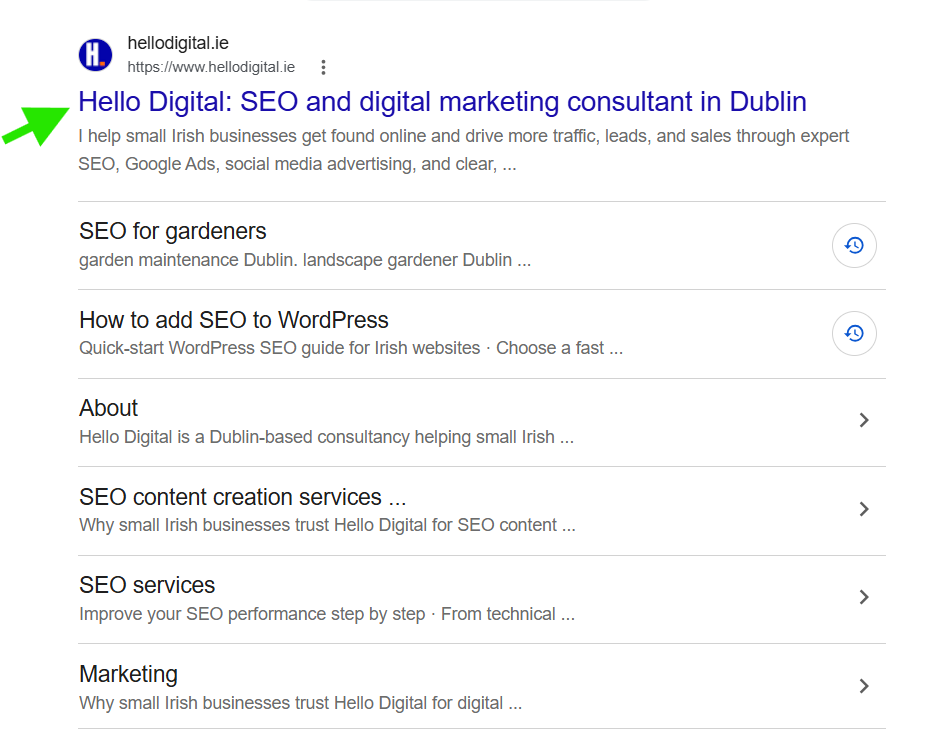
It should describe the page clearly and help distinguish it from the other results. Include the main topic naturally, but do not fill it with several versions of the same keyword.
Weak:
SEO Services, SEO Company, SEO Agency, SEO Consultant Ireland
Better:
SEO Consultant Dublin | Hello Digital
The meta description should give the searcher a reason to visit the page.
Summarise what the page offers, who it is for and what the visitor can do next. Avoid repeating keywords or making claims that the page does not support.
Google may use the meta description below the title in search results, but it can also create a different description from the page content.
Use one main heading that tells the visitor what the page is about.
The H1 can be similar to the title tag, but it does not need to match it exactly.
The opening should quickly confirm that the visitor has found the right page.
For example, a Dublin electrician’s service page should establish:
Which electrical service is available
Whether the work is residential or commercial
Which areas are covered
Qualifications
How to get in touch or request a quote
It should not begin with a general history of electricity or several paragraphs about the company before explaining the service.
Answer the questions someone needs to make a decision:
What does the service or product include?
Who is it for?
How does the process work?
What affects the price?
What qualifications or experience are relevant?
Which problems does it solve?
What happens after the customer gets in touch, books or buys?
The content should be specific to the service or product. Avoid repeating the same general company description across several pages.
Add information that helps the customer decide whether the business is credible and suitable.
This may include:
Qualifications
Accreditations
Photographs
Customer reviews
Examples of previous work
Named practitioners, specialists or authors
Contact details
Pricing information or the factors that affect cost
Delivery, returns or service policies
Use evidence that is specific to the page rather than adding the same trust statements everywhere.
Use images that help explain the service, product, process or result.
Add alt text when an image contains information that someone using a screen reader would otherwise miss. Describe what the image shows and avoid adding keywords that do not belong there.
Decorative images do not need descriptive alt text.
Link to pages that help the visitor continue their journey.
This may include:
Related services or products
Guides
Pricing or process information
Booking, contact or enquiry pages
Use link text that explains where the person is going. “Commercial cleaning services in Dublin” is better than “click here”.
Make the next step easy to understand and complete.
Depending on the business, this might be:
Request a quote
Book an appointment
Call the office
Buy the product
Download a guide
Arrange a consultation
The call to action should match the purpose of the page. A service page may need an enquiry or booking option, while a product page needs purchase and delivery information.
A shorter URL is not automatically better.
Changing an established page address can affect:
Existing rankings
Backlinks
Internal links
Analytics reporting
Bookmarks
Canonical tags
XML sitemap entries
Change a URL when the page is being replaced, merged, moved or reorganised for a reason.
Do not change it simply because an SEO tool recommends a shorter or neater version. When a URL does need to change, redirect the old address directly to the closest replacement.
The exact settings and steps differ between platforms such as WordPress, Shopify and other website systems.
See my guides to improving SEO on WordPress and doing SEO on Shopify for platform-specific instructions.
Good SEO content is not created by repeating a keyword a set number of times.
The page should give the reader the information they need and show that the person writing it understands the subject.
Useful content may include:
A clear answer to the main question
Practical steps or instructions
Examples
First-hand experience
Professional judgement
Common mistakes to avoid
Situations where the usual advice does not apply
Evidence from reliable sources
A clear next step
Do not add each of these simply to make the page longer. Include what helps the reader understand the subject or make a decision.
The strongest content often explains both what to do and what to consider before acting.
Generic advice might say:
Improve your page speed to help SEO.
A more specific explanation would say:
Start by checking oversized images, unnecessary scripts and poorly performing plugins. Test each change carefully because delaying or combining scripts can affect contact forms, ecommerce features, cookie controls or tracking.
The second version is better because it tells the reader where to start and explains what could go wrong.
The knowledge inside the business can make the content more unique and harder to copy.
For example:
An Irish mortgage broker can explain which missing documents delay applications.
A Dublin dentist can explain when a cosmetic treatment may not be suitable.
A commercial equipment supplier can explain how differences in specifications affect the buying decision.
A solicitor can explain when someone needs advice on their own circumstances rather than a general online answer.
This is better than repeating definitions that already appear on hundreds of other websites.
Use genuine examples where possible, but protect customer privacy and do not invent results, figures or experiences.
AI can help with tasks such as:
Organising notes
Comparing article structures
Identifying overlapping content
Summarising research
Improving an early draft
It cannot provide your experience, customer knowledge or professional judgement unless you supply that information.
AI-generated content becomes weak when it:
Repeats information already available elsewhere
Invents examples, claims or statistics
Removes important qualifications or exceptions
Creates a separate article for every keyword variation
Is published without being checked by someone who understands the subject
You do not need a separate set of rules for AI SEO.
The same fundamentals still apply: Google must be able to access the page, the content must answer the search clearly, related pages should be linked properly, and the website should work well for visitors.
A visitor should be able to understand how the website is organised and reach the most important pages without relying on Google.
Start by reviewing:
The main navigation
Service and product categories
Links from the homepage
Links between related services or products
Links from articles to service, product or category pages
Breadcrumbs, where they help people move through the site
Footer navigation
Important pages that have no internal links pointing to them
Check that the pages most important to the business are easy to find.
A main service page should not be hidden several levels deep in the website or only accessible through a blog article. Product and service categories should follow a structure that makes sense to customers, not just to the business.
The words used in a link should explain where it leads.
For example:
Commercial cleaning services in Dublin gives the reader more context.
Click here does not.
The anchor text should sound natural within the sentence. Do not force keywords into every link or use the same wording repeatedly.
Internal links can help someone:
Move from a general page to a more specific service or product
Find related information
Compare options
Understand the next step
Move from research to an enquiry or purchase
Do not add links simply to reach a target number. Each link should have a purpose.
A catering supplies retailer might organise its products into sections such as:
Catering equipment
Food preparation equipment
Refrigeration
Cooking equipment
Tableware
Plates
Cups
Cutlery
Brand pages
Buying guides
A guide to choosing commercial plates could link to the plate and tableware categories.
The category pages could then link to guides covering:
Product care
Sizing
Materials
Suitable uses
How to compare different options
This helps customers move naturally from researching a product to choosing and buying it.
The purpose of internal linking is not to place more keywords on the page. It is to make the website easier to navigate and help visitors find the information they need.
You do not need to fix every warning in an SEO or performance tool before improving the website.
Start with problems that stop Google accessing important pages, make the site difficult to use or prevent customers from enquiring, booking or buying.
Check whether:
The main navigation works properly on mobile
Text is easy to read without zooming
Buttons and links are large enough to tap
Important pages load slowly
Oversized images are delaying the page
Internal links lead to missing or incorrect pages
The whole website uses HTTPS
Contact forms submit correctly
Booking and checkout steps work from start to finish
Pop-ups block important content
The cookie banner covers buttons, contact details or navigation
Product filters work properly and do not create large numbers of unnecessary URLs
The website returns server errors
Duplicate versions of the same page are being created
Use PageSpeed Insights and Core Web Vitals to identify possible performance problems, but do not treat the score as the final objective.
Test changes on the actual website. Delaying scripts, combining files or removing code may improve a performance score while breaking a form, booking system, product filter, cookie banner or analytics tracking.
A faster page is not an improvement if the customer can no longer complete the action the page was built for.
My guide to how website speed affects SEO explains which performance issues deserve attention and how to avoid chasing every warning.
A restaurant website may pass an automated mobile test and still be frustrating to use.
For example:
The booking button is difficult to find
The menu opens as a PDF that is hard to read on a phone
The cookie banner covers the contact details
Large images slow down the page
The address does not open in a map
The opening hours are buried in the website
These are more important to a potential customer than a single performance score.
Technical SEO should improve how the website works for Google and for the people using it.
Local SEO matters when customers visit your premises or when you serve a specific area.
This includes businesses such as:
Clinics
Restaurants
Tradespeople
Retailers
Local professional services
Hotels and other hospitality businesses
Businesses that travel to customers
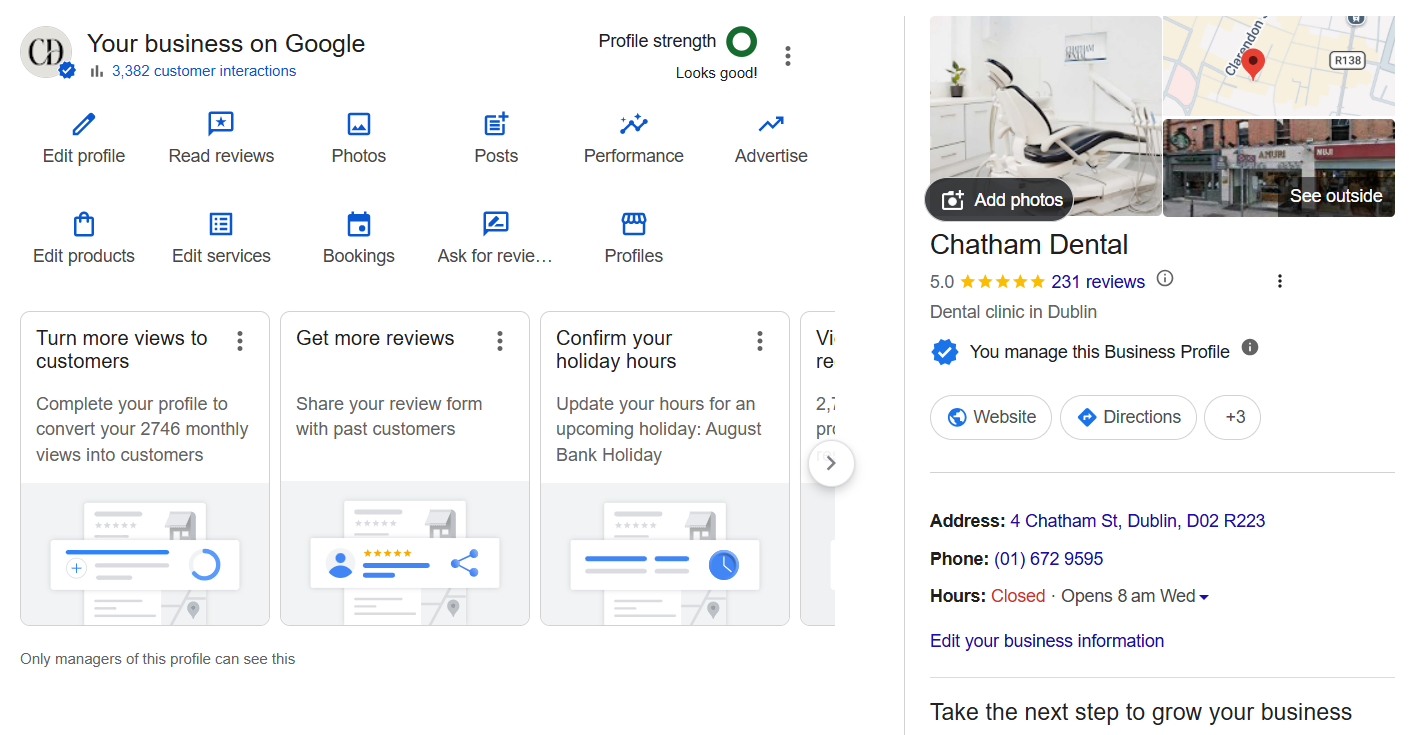
Start by checking your Google Business Profile, which controls much of the information people see about your business in Google Search and Maps.
Make sure it includes:
Your correct business name
The primary category
Your address or service area
Phone number
Website
Opening hours
Services or products
Recent photographs
Booking or enquiry links
Any temporary closures or changes to opening hours
The information should match what appears on your website and other trusted business listings.
Choose the primary category carefully. It should describe the main service the business provides, not every service it offers. Add secondary categories only where they are relevant.
Keep the profile active by:
Adding new photographs
Updating services and opening hours
Checking that links still work
Answering customer questions
Encouraging genuine customers to leave reviews
Responding to reviews in a professional way
Google Business Profile's management page:
Not every Dublin-based business needs the same approach.
A café in Ranelagh depends heavily on nearby customers finding it in Maps and local search results.
A physiotherapy clinic may attract patients from surrounding areas who are willing to travel a reasonable distance.
A Dublin-based SEO consultant may work with businesses across Ireland, so targeting individual neighbourhoods would give the wrong impression.
An ecommerce business may be based in Dublin but sell throughout Ireland, making product and category rankings more important than local visibility.
Your local SEO activity should reflect where your customers are, how far they are willing to travel and whether they visit you or you travel to them.
Links and mentions from other websites can help Google discover your content and understand how your business is connected to its industry, location and customers.
The aim is not to collect as many links as possible. Focus on links and mentions that make sense because of a real relationship, contribution or piece of work.
Opportunities for an Irish small business may include:
Professional memberships
Industry associations
Local chambers of commerce
Suppliers and manufacturers
Business partners
Event sponsorships
Expert comments for journalists or industry publications
Original research, data or practical resources
Local news and industry publications
Digital PR campaigns based on something genuinely newsworthy
Start with organisations and businesses you already have a connection with.
For example, check whether:
Your professional membership includes a public member profile
A supplier lists approved retailers, distributors or partners
A chamber of commerce includes your business in its directory
An event you sponsor links to participating businesses
A business partner mentions your joint work
An industry publication accepts expert comment on relevant topics
A fire-safety company could earn links and mentions through:
Professional bodies
Training partners
Industry resources
Guidance on changes to regulations
Commentary for business or property publications
Events aimed at employers, landlords or facilities managers
These mentions are good because they reflect the company’s work and expertise.
Submitting the business to hundreds of unrelated directories would not provide the same value.
Avoid:
Buying large packages of links
Exchanging links with unrelated websites
Posting links in forums where they do not add anything new
Publishing weak guest articles only to gain a backlink
Asking every website to use the same keyword-heavy link text
Treating third-party authority scores as Google rankings
A link should make sense to someone who visits the page, even if search engines did not exist.
Relevance, trust and a genuine reason for the link matter more than the total shown in a backlink tool.
SEO work does not end when a page is published or updated.
Go back and check what changed, whether the page gained visibility and whether that visibility led to enquiries, bookings or sales.
Use Google Search Console to monitor:
Clicks from Google Search
Impressions
Search queries
Pages appearing in search results
Click-through rate
Indexing status
Core Web Vitals and HTTPS reports
Use Google Analytics and your business systems to monitor:
Enquiries
Phone calls
Bookings
Sales
Quote requests
Downloads
Visits to important service, product or category pages
Conversions where organic search played a part
Keep the two types of data separate.
Google Search Console shows what happened in Google Search. Analytics and your enquiry or sales systems show what visitors did after reaching the website.
Do not judge the work only by total traffic or an average ranking across the whole website.
A page can attract more visitors without producing more business. Another page may receive less traffic but generate better enquiries.
For example, an article may attract 2,000 visits from broad informational searches and generate no enquiries.
A service page may attract 100 visits and generate five qualified enquiries.
The article produced more traffic. The service page produced more value for the business.
When you update an important page:
Record its performance before the change.
Note exactly what you changed and when.
Allow enough time for Google to recrawl the page and for data to build.
Compare the same page, queries and conversions before and after the change.
Keep the change, improve it further or reverse it based on the result.
Move to the next priority.
Where the business is seasonal, compare results with the same period in the previous year rather than relying only on the previous month.
The aim is not to prove that every change worked. It is to learn which work improves visibility, attracts the right visitors and contributes to the business.
My SEO analytics guide explains how to compare search visibility, landing-page performance and business outcomes without relying on one headline metric.
DIY SEO becomes unproductive when completing tasks starts to matter more than solving the right problems.
I would not prioritise:
Trying to make every indicator in an SEO plugin turn green
Publishing separate articles for small variations of the same keyword
Adding keywords to image alt text when they do not describe the image
Changing established URLs simply to make them shorter
Paying for SEO software before deciding what you need it to help with
Creating near-identical pages for every town or suburb you serve
Publishing articles only to maintain a content schedule
Tracking rankings without measuring enquiries, bookings or sales
Treating every warning in a technical audit as urgent
Copying a larger competitor’s website structure without checking whether it suits your services, customers or resources
The aim is not to complete as many SEO tasks as possible.
It is to identify the work that will make the website easier to find, easier to use and more likely to generate the right enquiries or sales.
Consider getting professional help when:
You are not sure which SEO work should come first
Organic traffic, enquiries or sales have fallen sharply
A new website, redesign or migration is being planned
Several pages are competing for the same searches
Important pages are not appearing in Google
Developers are changing URLs, templates or website platforms
Ecommerce filters are creating large numbers of extra URLs
You need to review or consolidate a large amount of content
You are spending significant time on SEO without knowing whether it is working
The value of the opportunity makes specialist input worthwhile
You do not need to hand over every SEO task.
A business owner or marketing team can handle customer research, subject knowledge and content updates. An SEO consultant can then focus on strategy, technical checks and changes that carry more risk.
This approach keeps the business involved while bringing in specialist help where you need it most.
Yes. Small businesses can manage many SEO tasks internally, including content updates, title tags, internal links, local business information and basic performance monitoring.
Technical changes, migrations and complex indexing problems may require specialist help.
You can complete many SEO tasks using free tools such as Google Search Console, Google Analytics and PageSpeed Insights.
The main cost is time. You may also choose to pay for keyword research, crawling, competitor analysis or rank-tracking tools.
Record the website’s current performance and check that Google can access and index the important pages.
Do not begin by publishing more content until you understand what already exists and which parts of the business should be prioritised.
There is no fixed timeline.
The result depends on the condition of the website, the competition, the type of change, the strength of the content and how quickly Google recrawls and reassesses your pages.
Some technical corrections can be processed relatively quickly. Building visibility in a competitive market takes longer.
The right amount depends on the website and the commercial opportunity.
A local service business with a small website may begin with a focused monthly review and a limited number of high-priority improvements. A large ecommerce business requires more continuous technical, category and product work.
Consistency matters, but priority matters more than volume.
Not automatically.
Create a separate location page only when it provides genuinely useful information for that area and serves a distinct customer need. Do not duplicate the same page and replace only the location name.
No separate technical process is required.
Make sure the content is accessible, accurate, well structured and supported by expertise. The same SEO foundations remain relevant.
Start with:
Google Search Console
Google Analytics
PageSpeed Insights
Your website’s content-management and SEO settings
Add paid tools when there is a defined need, such as competitor research, website crawling, keyword analysis or rank tracking.
Doing your own SEO is possible, but you do not need to attempt every task yourself.
I help small businesses in Dublin and across Ireland identify what is holding their websites back, decide which opportunities deserve attention and create a practical SEO plan based on their business priorities.
This can include technical SEO audits, keyword and content strategy, page optimisation, content consolidation and ongoing support.
Book a free consultation to discuss your website and the right next steps.
Alessandro Boscolo Conway — Hello Digital
I'm a Dublin-based freelance SEO and digital marketing consultant with over 20 years of experience, including time on Google Ireland’s Search Quality team.
I run Hello Digital, a consultancy that helps startups and small businesses across Ireland grow online through clear strategy, expert delivery, and practical support.
I've worked with over 50 Irish companies to improve their visibility, generate better leads, and grow sustainably through SEO and digital marketing.
I'm a certified Google Partner and a trusted advisor to e-commerce brands, local services, and fast-growing startups.
Based in Dublin, 20+ years of experience
Former Googler, certified Google Partner, SEO strategist, and performance marketer
Trusted by 50+ Irish startups, e-commerce brands, and local businesses