

SEO


If you are a small business owner in Ireland, you already know that your customers are searching for you right now. Whether they are looking for a plumber in Cork, solicitors in Dublin, or boutique hotels in Galway, they are turning to Google first.
In fact, recent data shows that over 63% of high-intent searches result in a paid click. Unlike social media, where you have to interrupt people to get their attention, Google Ads puts you in front of people who are actively looking for a solution and are ready to buy.
But here is the thing, Google has made it too easy for everybody to get started.
Most Irish business owners sign up for Google Ads, follow Google's default Smart Mode suggestions, and end up paying for clicks that never convert. They target Ireland broadly and pay for clicks from tourists who left weeks ago. They use default broad match keywords and pay for irrelevant searches.
This guide is different. We are going to ignore the default settings that benefit Google's bottom line and show you the expert mode setup that benefits yours.
Smart Mode vs. Expert Mode: Google defaults new accounts to smart mode (simplified, automated, expensive). To see actual data and control your costs, switch to Expert Mode.
Broad match: Default keyword settings allow Google to show your ad for loosely related terms. We will use phrase and exact match to ensure you only pay for customers searching for exactly what you sell.
VAT & currency: You must select Euro (€) during setup. This option is permanent —you cannot change it later. Irish businesses must enter their VAT number to avail of the reverse charge mechanism (0% VAT on invoices). If you skip this, you may be charged unnecessary taxes or struggle to claim them back later.
Location precision: Don't just target Ireland, if you only serve a local area or nearby counties. We will show you how to target specific counties or a radius around your business to stop wasting money on leads you can't service.
Before you even log into Google Ads, you need to have your digital house in order. We often see Irish businesses eager to spend money on ads while their website infrastructure is fundamentally broken.
If you skip this phase, you are effectively filling a bucket with a hole in the bottom. Google will happily take your money to send people to your site, but if the site doesn't load or track them, you are burning cash.
You are about to pay for every single visitor. In competitive sectors like legal, insurance, or emergency services, a single click can cost between €5 and €20. If your website takes 5 seconds to load on a mobile phone using 4G in Kerry or Donegal, that visitor will leave before they even see your offer.
Data consistently shows that bounce rates skyrocket if a page takes longer than 3 seconds to load.
To test your page speed, run your landing page (not just your home page) through Google PageSpeed Insights.
Ignore the total score out of 100. Look at Largest Contentful Paint (LCP). You need this to be under 2.5 seconds.
Open your website on your phone, turn off wifi, and use 4G data. Try to click your Call Now or WhatsApp button. If it takes more than two taps or involves pinching and zooming, your ad money will be wasted. 70% of your Google Ads traffic will likely be mobile.
Do not send ad traffic to your homepage.
If you are advertising emergency boiler repair, link directly to your boiler repair page, not your general pumbing services page.
The visitor must see exactly what they searched for in the headline of your page within 1 second of arrival.
Google Ads has its own built-in tracking pixel, but it is biased — it wants to claim credit for every sale to encourage you to spend more. You need an independent auditor, and Google Analytics 4 (GA4) is the industry standard for this.
Google Ads relies on machine learning. It needs to know which clicks turned into customers so it can find more people like them. If you don't feed it this data from GA4, it will just find you people who click ads, which are often low-quality leads.
Check for Google Tag: Ensure you have the Google Tag (gtag.js) installed. Look for a "Measurement ID" that starts with G- in your website source code.
Link the accounts: You do not need to manually paste code for every single action. Go to your GA4 Admin panel > Product Links > Google Ads Links. Link your new Google Ads account here.
Define Key Events (= your conversions): In GA4, mark your most important events (e.g., generate_lead, purchase, phone_click) as Key Events. Later, inside Google Ads, you will import these Key Events. This is the gold standard for tracking because it ensures your Google Analytics data and Google Ads data match perfectly.
Getting your billing setup wrong is the most common administrative headache for Irish businesses on Google Ads. It can lead to months of accounting issues.
When you create your account, Google may default your currency to US Dollars ($) or Pound Sterling (£) if you are using a VPN or certain browser settings.
You must select Euro (€). This setting is permanent. You cannot change it later. If you set it to USD by mistake, you will pay a currency conversion fee (usually 2-3%) on every single invoice for the lifetime of the account. You would have to delete the account and start over to fix it.
Google's European headquarters is in Dublin. This creates a specific tax situation for Irish businesses known as reverse charge.
If you ARE VAT registered, enter your VAT number in the Billing & Payments section immediately during setup. Google will not charge you VAT on your invoices. Your invoice will show €0.00. You must self-account for this VAT in your own VAT3 returns (accounting for it as both a sale and a purchase). This is cash-flow positive as you don't have to pay the VAT to Google and claim it back later.
If you are NOT VAT registered, leave the VAT field blank (or enter "Unregistered"). Google is legally required to charge you Irish VAT at the standard rate (currently 23%). You cannot claim this back.
When you're asked to choose the account type, ensure you select Organisation (Business) rather than Individual if you want the invoice to feature your company name for tax purposes.
This is the single most critical technical step in the process. If you get this wrong, the rest of the advice here will be impossible to follow because the buttons and sections we reference in this guide simply won't exist on your screen.
Google’s onboarding flow is aggressively designed to push you into Smart Mode. This is a simplified version of Google Ads where the hard decisions are automated. While this sounds appealing, it removes your ability to control negative keywords, match types, and bidding caps. In Smart Mode, you are essentially handing Google your credit card and asking them to spend it however they see fit.
You need Expert Mode. Do not let the name scare you — it just means Standard Mode where you can actually see where your money is going.
When you create a new Google Ads account, Google puts you into a guided setup wizard. Here is how to bypass it and get the professional interface.
Once you log in with your Gmail account and click New Google Ads Account, Google will ask: "What’s your main advertising goal?" It will offer options like "Get more calls," "Get more website sales," or "Get more visits to your physical location."
Do not click these. Clicking these locks you into the Smart Mode workflow immediately.
Look at the very bottom of the screen. You will see a small, plain text link that says: "Are you a professional marketer? Switch to Expert Mode"
Click this link.
After switching to Expert Mode, Google will try one last time to make you launch a campaign immediately by asking for your objective again (Sales, Leads, Traffic).
While you can choose an objective here, the cleanest way to set up your account is to look for another small link in the bottom right corner: "Create an account without a campaign."
This creates a perfectly empty shell account. It allows you to set up your billing, link your Google Analytics, and conduct keyword research before you are under pressure to write ads and enter credit card details.
If you have already created an account and your dashboard looks simple — mostly colourful tiles, a Verified Calls number, and no Keywords tab on the left — you are in Smart Mode.
Click the Settings (gear icon) in the top-right corner.
Look for the option Switch to Expert Mode.
Confirm the switch.
Note: Once you switch to Expert Mode, you cannot switch back to Smart Mode. This is a good thing.
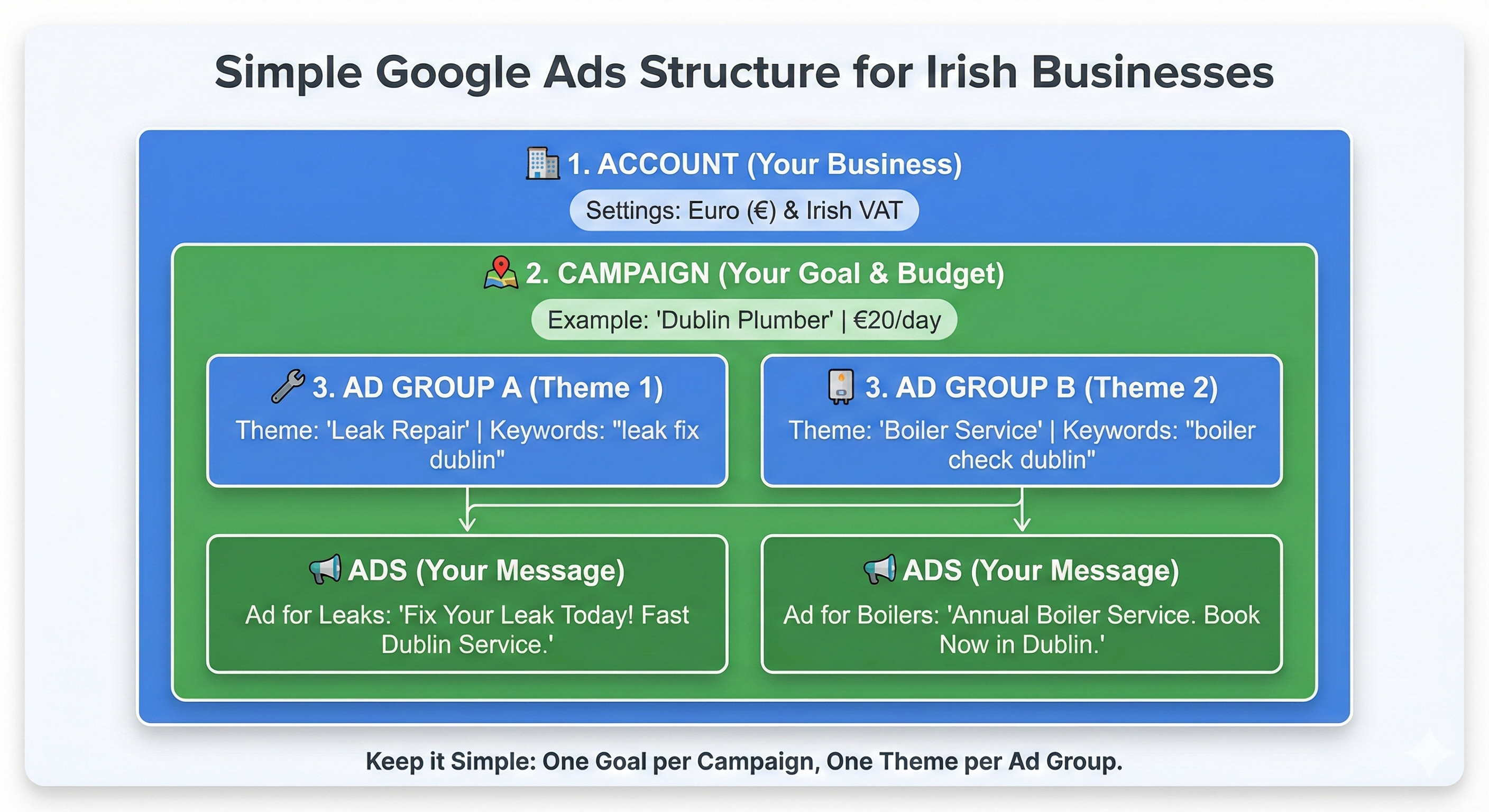
Welcome to the professional Google Ads interface. It looks like a spreadsheet, which can be intimidating at first. Let’s break down the hierarchy so you know exactly where you are.
Google Ads is built in tiers. Understanding this hierarchy is key to not getting lost:
Account (Level 1): This is your house. Your billing and email login live here.
Campaign (Level 2): These are the rooms in the house. You set your Budget and Location here. For example, you might have one Campaign for Boiler Repair (targeted at Cork) and another for Bathroom Renovation (targeted at all of Munster). You never mix different budgets or locations in the same campaign.
Ad Group (Level 3): These are the drawers in the room. This is where you organise your Keywords and Ads. For example, inside your Boiler Repair campaign, you would have one Ad Group for Gas Boilers and a separate Ad Group for Oil Boilers.
Keywords & Ads (Level 4): The contents of the drawer. The keywords trigger the ads.
On the far left of your screen is a dark grey or light grey navigation bar.
Campaigns: Click this to see your main buckets of spend.
Ad groups: Click this to drill down into specific themes.
Keywords: This is the most important tab. It shows you exactly what words you are bidding on.
Search terms: (Often hidden under Insights and Reports or strictly under Keywords). This shows you what people actually typed into Google to trigger your ad. This is the single most important report for saving money.
In the top bar, you'll fin the Tools and settings (Wrench icon): This is where the utilities live.
Planning > Keyword Planner: Where you find new keywords.
Billing: Where you get your VAT invoices.
Measurement > Conversions: Where you tell Google what a lead or sale looks like.
This is where you build the engine. You will now create your first Search campaign —these are the text ads that appear on Google when people actively search for services.
Get these settings wrong, and you will pay for traffic that has zero chance of converting.
When you click New Campaign, Google presents a grid of objectives.
Sales: Choose this only if you are an e-commerce business (selling products directly through a shopping cart).
Leads: Choose this if you are a service business (solicitor, tradesperson, B2B, clinic) and you want phone calls or form fills.
The most robust option is actually the one often hidden at the end: "Create a campaign without a goal's guidance."
Choosing Leads or Sales forces you into certain default settings. Choosing No guidance gives you full unlocking of every setting from the start. But if you are unsure, selecting Leads is safe — provided you follow the network steps below.
This is the most common money pit for Irish SMEs. By default, under the Networks section, Google checks two boxes:
Search Network (Keep this checked).
Display Network (Uncheck this immediately).
The Search Network puts you in front of people actively typing "emergency plumber near me."
The Display Network puts your text ad on random blogs, news sites, and apps while people are trying to read an article or play a game. They are not looking for a plumber; they are looking for entertainment.
Display network clicks are cheap, but they rarely convert for service businesses. They will eat up 20-30% of your daily budget with low-quality traffic.
Pro tip: Never mix Search and Display in the same campaign. If you want to run banner ads later, create a separate Display campaign.
Google defaults your location to Ireland. For a local business, this is dangerous.
If you are a dentist in Limerick, paying for a click from a user in Dublin is a total waste of money.
Select Enter another location. Type in your specific catchment area. You can target by County (e.g., County Cork) or City (Galway). For very local services (e.g., pizza delivery or a gym), click Advanced Search > Radius and enter your Eircode. Set a 5–10km radius to ensure you only pay for locals.
At the bottom of the Locations section, there is a collapsed menu called Location options. Click it. You will see two options:
Option A (Default): "Presence or interest: People in, regularly in, or who've shown interest in your targeted locations."
Option B: "Presence: People in or regularly in your targeted locations."
Switch to Option B ("Presence"). The default (Option A) allows someone in New York to see your ad just because they searched for "hotels in Ireland" last week. If you are a local service provider, you only want people who are physically here.
Set your campaign language to English.
In Ireland, you usually don't need to add Irish unless you specifically want to target Gaeilgeoirí searching in Irish, but English covers 99.9% of searches.
The Bidding section is your financial control centre. Google will strongly suggest Maximise Conversions.
Maximise Conversions works by using artificial intelligence to find users likely to buy. But a brand new account has zero data. It doesn't know what a buyer looks like yet. If you use this strategy on Day 1, Google might bid €15.00 for a single click just to test it.
Change the bid strategy to Maximise Clicks.
Check the box that says "Set a maximum cost per click bid limit."
Set this to something reasonable for Ireland, like €1.50 or €2.00.
This forces Google to go out and find you the maximum volume of traffic without overspending on any single person. It builds up data safely.
After 30-60 days, when you have recorded 30+ conversions (leads/sales), you can switch to Maximise Conversions to let the AI take over.
If the Campaign settings are the engine, the Keywords are the fuel. This is how you tell Google exactly which users you want to reach.
Most beginners make the mistake of dumping 50 loosely related keywords into one bucket. This confuses Google and lowers your Quality Score (which makes your ads more expensive). Instead, we will use a structured, surgical approach.
You do not need to guess what your customers are typing. Google gives you a free tool that tells you exactly what people in Ireland are searching for.
Click Tools and settings (wrench icon) in the top menu.
Under Planning, select Keyword Planner.
Choose Discover new keywords.
By default, this tool might show data for the US or UK. Click the location pin icon and select Ireland (or your specific county). Type in 2-3 basic descriptions of your service, e.g., "physio dublin," "back pain relief," "sports injury clinic."
The tool will spit out hundreds of suggestions. Ignore the Competition column (that refers to big brands, not small businesses). Look at Avg. monthly searches.
You might see "back pain" has 5,000 searches, while "physio near me" has only 500.
"Back pain" is a research term (low intent). They might want a Wikipedia article or a heat patch. "Physio near me" is a buying term (high intent).
Select 10–20 high-intent keywords that clearly indicate someone wants to hire a professional now.
This is the technical secret sauce of Google Ads. When you type a keyword into Google, you are not just typing the word; you need to apply a syntax to tell Google how strict to be.
If you just type plumber dublin, you are using Broad Match, and you will likely waste money.
Just the words: plumber dublin
Google shows your ad for anything remotely related to your words.
Your ad might show up for "plumbing course dublin," "plumber salary," or even "drain cleaner at Tesco."
Do not use this for a small budget. It is too loose.
Put quotes around the words: "plumber dublin"
Your ad shows only if the search includes the meaning of your keyword, usually in that order or close to it.
It matches "emergency plumber dublin" or "best plumber dublin price." It will NOT match "plumbing course."
Use this for 80% of your keywords. It captures the right intent while allowing for small variations.
Put square brackets around the words: [plumber dublin]
Your ad shows only for that exact search (or very close misspellings).
It matches "plumber dublin". It will NOT match "best plumber dublin".
Use this for your absolute best, most expensive keywords to ensure total control.
A Negative Keyword is a word you tell Google never to show your ad for. This is how you filter out the tyre kickers.
For an Irish small business, you are looking for clients, not students, DIY enthusiasts, or job seekers.
Go to the Keywords tab on the left, then click Negative Keywords. Add these immediately:
Imagine you are a solicitor. You pay €10 for a click on the keyword "solicitor cork". Without negative keywords, you might pay €10 for someone searching "solicitor course cork" (a student). By adding "course" as a negative keyword, you block that search. That €10 is saved and can be used to bid on a real client instead.
Pro tip: Check your Search Terms report once a week. This report shows you exactly what people typed to trigger your ads. If you see a word you don't like (e.g., a competitor's name or a service you don't offer), click it and select "Add as negative keyword."
The days of writing a single, static text ad are over. Google has retired Expanded Text Ads in favour of Responsive Search Ads (RSAs).
In the old days, you wrote one headline and one description, and everyone saw the same thing. Now, you feed Google a list of options (Assets), and Google’s AI mixes and matches them to see which combination works best for each specific user.
This sounds complicated, but it is actually a powerful way to find out what sales pitch works best.
When you create an ad, you will see fields for 15 Headlines (30 characters) and 4 Descriptions (90 characters). You do not need to fill them all, but the more you provide, the better the system works.
Do not write 15 variations of the same sentence. If you do, Google has nothing to test. Instead, break your headlines down into three distinct categories:
Hook (Headlines 1–5): These must include your target keyword. Examples: "Emergency Plumber Cork," "24/7 Plumbing Repair," "Fix Your Boiler Today."
Benefits (Headlines 6–10): These explain why they should choose you. Focus on speed, trust, and price. Examples: "No Call-Out Fee," "RGII Registered Gas Installers," "Arriving Within 60 Minutes."
Call to action (Headlines 11–15): Tell them exactly what to do. Examples: "Book Your Repair Online," "Call for a Free Quote," "Check Availability Now."
When it comes to Descriptions, you have four slots. Use two to expand on your service details and two to focus on trust signals (e.g., "Family run business serving Munster for over 20 years. Fully insured and VAT registered.").
As you write your ad, you will see a circular meter at the top of the screen called Ad Strength, ranging from Poor to Excellent.
While you shouldn't obsess over metrics, a Poor ad strength can limit how often your ad shows. Google may actually throttle your impressions if it thinks your ad isn't relevant.
Include the keyword in the headline: If your keyword is "Solicitor Dublin," make sure that exact phrase appears in at least one headline.
Make headlines unique: Google hates repetition. If Headline 1 is "Best Plumber" and Headline 2 is "Top Plumber," your score will drop. They need to be distinct ideas.
Use the full character count: Don't write short, 10-character headlines. Use the space to sell.
You will see a small pin icon next to every headline. This allows you to force a specific headline to always show in Position 1, 2, or 3.
Google hates pinning. It restricts the AI's ability to test. Pinning will almost always lower your Ad Strength score.
Only pin if you must display a disclaimer, or if it is vital that your Brand Name is always the first thing seen. Otherwise, leave them unpinned and let the data decide.
Pro tip: Pinning can be useful when you use Keyword Insertion, a functionality that displays the search term a user types in instead of one of your headlines. You might want to use Keyword Insertion to increase your click-through rate (CTR) or when you have a mix of keywords in the same ad group that have nothing in common, but it makes sense for your business to keep them together.
Assets (formerly called Ad Extensions) are free tools that make your ad physically bigger on the screen. An ad with assets can take up 30% more screen real estate than a competitor's ad without them — for the same price.
These are the blue links that appear under your main description. They allow users to jump straight to specific pages.
Add at least 4 sitelinks. For example, "Contact Us," "See Our Pricing," "Customer Reviews," "Emergency Services."
Don't just link to your Homepage. These must be deep links to different URLs.
These are short, non-clickable snippets of text that appear at the end of your description. They are perfect for trust signals. For example, "Irish Owned," "VAT Registered," "Nationwide Delivery," "Established 2005," "Free Parking."
This adds your phone number to the ad. On a mobile phone, it appears as a "Call" button.
Ensure you select "Ireland" (+353) and enter your mobile or landline. Google can replace your number with a forwarding number to track how long the call lasted. This is highly recommended so you can see if your ads are driving real conversations.
You can have the best keywords and the sharpest ads in Ireland, but if you don't track the results, you are essentially gambling.
Measurement is not just about counting clicks. It is about training the algorithm. When you feed Conversion data back into Google Ads, the system stops guessing and starts learning. For example, it learns that people who search at 9 AM on a Tuesday are more likely to buy, and it adjusts your bids automatically.
In Phase 1, we showed you how to link your Google Analytics 4 (GA4) account. Now, we are going to use that link to tell Google Ads exactly what a win looks like.
Importing conversion from GA4 is far superior to trying to paste code snippets onto your website manually, which might often break on Wix or Squarespace sites.
In your Google Ads dashboard, click Goals (or Tools and settings > Measurement) > Conversions.
Click the blue button: + New conversion action.
You will see four tiles (Website, App, Phone calls, Import). Select Import.
Select Google Analytics 4 properties, then Web, and click Continue.
Google will now scan your linked GA4 account and show you a list of Key Events that you created in Google Analytics.
For example, you might see generate_lead or purchase. Check the box next to the event you want to track. Click Import and continue.
Once imported, click on the conversion name to check its settings. Ensure this is set to Primary. This tells Google's AI: "Use this data to optimise my bidding."
Note: If you track something minor like Newsletter Signup but don't want Google to optimise for it, set that one to Secondary (Observation only).
We cannot stress this enough: getting your tax settings wrong on day 1 creates a mess that is difficult to fix later. Google Ireland Limited is based in Dublin, which means Irish tax laws apply specifically to you.
Go to Billing > Settings (or Billing Setup).
Account type: You must select Organisation (Business). If you select Individual, Google often removes the ability to enter a VAT number entirely. Even if you are a sole trader, select "Organisation" to ensure you get a proper business invoice.
Tax information: If you have an Irish VAT number (e.g., IE1234567T), enter it here. Google will verify the number. Once verified, your invoices will be generated with 0% VAT under the "Reverse Charge" mechanism. If you do not enter a number, Google will automatically add 23% VAT to every charge.
Google does not email you invoices (a common frustration). You must fetch them manually.
Go to Billing > Documents.
Your legal tax invoice is generated once a month (usually the 5th working day of the following month).
Download the EU Tax Invoice PDF. This is the only document Revenue will accept; the daily credit card receipts are not sufficient for VAT returns.
The biggest myth in digital marketing is Set It and Forget It. If you leave a Google Ads account alone for a month, it will almost certainly drift off course. The algorithm will find looser matches, and your costs will creep up.
But you don't need to stare at the screen all day. For most Irish small businesses, a dedicated 20-minute review once a week is enough to keep the account healthy and profitable.
This is the single most important task you will do. It is where you find out where your money actually went.
"plumber dublin").Go to Keywords in the left-hand menu.
Click on Search terms (sometimes nested under "Insights and reports").
Set your date range to Last 7 days.
Sort the column by Cost to see what is eating your budget.
Scan down the list of terms.
If you see a perfect search term (e.g., "emergency boiler repair cork"), tick the box next to it and select "Add as keyword." This tells Google: "Yes! Find me more people like this."
If you see a waste of money (e.g., "boiler repair training course"), tick the box and select "Add as negative keyword." Every time you add a negative keyword, your campaign becomes more efficient. You stop paying for junk, which effectively lowers your cost per acquisition over time.
Quality Score is Google’s report card for your account. It is a score from 1–10 that tells you how relevant your ad is.
It is not just a vanity metric; it is a financial multiplier.
Score 10/10: Google gives you a discount. You might pay €0.80 for a click that costs your competitor €1.50.
Score 3/10: Google charges you a penalty. You pay more to show up in a lower position.
By default, Google often hides this score. To see it:
Go to the Keywords tab.
Click the Columns icon (three vertical bars) above the table.
Click Quality Score section.
Tick Quality Score (and ideally Landing Page Exp and Ad Relevance).
Click Apply.
Look at the component columns to see where you are failing:
If you have followed the steps in this guide, you have not just set up ads — you have built a professional customer acquisition machine.
Most small business owners in Ireland treat Google Ads like a slot machine. They put money in, pull the handle (Smart Mode), and hope for a win. When they lose, they blame the platform and say, "Google Ads doesn't work."
You have done it differently. By switching to Expert Mode, filtering out Negative Keywords, and setting up proper Conversion Tracking, you have built a system based on data, not luck.
Do not panic if your phone doesn't ring off the hook on day 1.
Days 1–7: Google is testing. Your Cost Per Click (CPC) might fluctuate.
Days 7–14: The data starts rolling in. You will see your first search terms.
Day 30: This is when the magic happens. You have enough data to cut the waste and bid harder on the winners.
Digital marketing is not a sprint; it is an asset you build over time. Treat this account like an employee: give it clear instructions, check its work weekly, and it will become the most profitable member of your team.
There is no fixed price menu. Google Ads operates on an auction system. You bid what you are willing to pay for a click, and the market determines the actual price.
Cost Per Click (CPC): In Ireland, a click can range from €0.50 for niche local services to €20.00+ for highly competitive industries like emergency plumbing, insurance, or personal injury law.
Daily Budget: You set the limit. Most small businesses in Ireland start with a budget of €10–€30 per day.
Be aware that clicks in Dublin are often 20–30% more expensive than in other counties due to higher competition.
Think of SEO (Search Engine Optimisation) as buying a house, and Google Ads as renting an apartment.
Google Ads (PPC): It is immediate. You pay rent (bid), and you move in (appear at the top) instantly. As soon as you stop paying, you disappear.
SEO: It is a long-term asset. You build content and authority over months or years. It is free to click, but expensive in time and effort to rank.
Use Google Ads to get customers today while you work on your SEO for tomorrow.
Yes, and you should. Targeting Ireland is often a mistake for local businesses.
Google puts all new accounts into Smart Mode by default because it is easier for beginners to set up. But it is designed to spend your budget with minimal input from you.
In Smart Mode, you cannot see exact search terms or use negative keywords effectively. You must manually switch to Expert Mode in your settings to regain control over your money.
Google does not email invoices. You must retrieve them manually to stay compliant with Revenue.
Click Tools and settings (Wrench icon) > Billing > Documents.
Wait until the 5th working day of the new month.
Note: Do not use the Statement of Account or daily credit card receipts for your VAT3 returns. Only the official EU Tax Invoice contains the VAT numbers required by Irish tax law.
CTR is the percentage of people who see your ad and decide to click it.
In Ireland, a CTR of 3–5% on the Search Network is considered decent.
A CTR above 8–10% is excellent. It means your ad is highly relevant.
If your CTR is below 1%, your ad is irrelevant to the keyword, and Google will penalise you with higher costs.
This is a common debate. "Why pay for a click if they are already searching for me?"
If you don't bid on your name, your competitors might. It is cheap to bid on your own brand (often €0.05–€0.10 per click), and it allows you to control the message and send users to a specific landing page.
If you search for your business name and see a competitor’s ad above your organic listing, you must bid on your brand name to protect your traffic.
Once you create an ad, it goes into review. This usually takes 24–48 hours, though it can be as fast as 1 hour.
While ads show immediately after approval, performance is often volatile for the first 7 days as Google's algorithm learns which users interact best with your ads.
Stop searching for your own business! When you search for your keywords but don't click on your ad (because you don't want to pay), Google thinks the ad is irrelevant to you. Eventually, it stops showing it to you entirely. This distorts your view of reality.
Use the Ad Preview and Diagnosis tool inside the dashboard. It simulates a search in Ireland without counting as an impression or costing you money.
Technically, yes, using Smart Campaigns linked to a Google Business Profile.
Sending paid traffic to a Google Maps listing is rarely as effective as sending them to a dedicated landing page. You cannot track conversions properly, and you look less professional.
Even a simple one-page website (landing page) built on WordPress, Squarespace, or Wix will convert significantly better than a map listing.
Setting up a Google Ads account is easy — Google makes sure of that. But turning those clicks into profitable revenue? That is a specialised skill.
Don’t let your marketing budget become an expensive experiment. You shouldn't have to pay a tuition fee to Google just to learn how the platform works.
Stop wasting budget on learning steps. Every day you spend figuring it out is money donated to Google without a return. I can help you bypass the trial-and-error phase to get you straight to the results, optimising your spend from day 1 so every euro works harder.
Book your free 20-minute strategy consultation and let’s look at your current Google Ads setup, discuss your goals, and identify the low-hanging fruit. No pressure and no sales pitches. The goal here is to give your a clear understanding of where you're losing money and how we can fix it.
Alessandro Boscolo Conway — Hello Digital
I'm a Dublin-based freelance SEO and digital marketing consultant with over 20 years of experience, including time on Google Ireland’s Search Quality team.
I run Hello Digital, a consultancy that helps startups and small businesses across Ireland grow online through clear strategy, expert delivery, and practical support.
I've worked with over 50 Irish companies to improve their visibility, generate better leads, and grow sustainably through SEO and digital marketing.
I'm a certified Google Partner and a trusted advisor to e-commerce brands, local services, and fast-growing startups.
Based in Dublin, 20+ years of experience
Former Googler, certified Google Partner, SEO strategist, and performance marketer
Trusted by 50+ Irish startups, e-commerce brands, and local businesses