

SEO
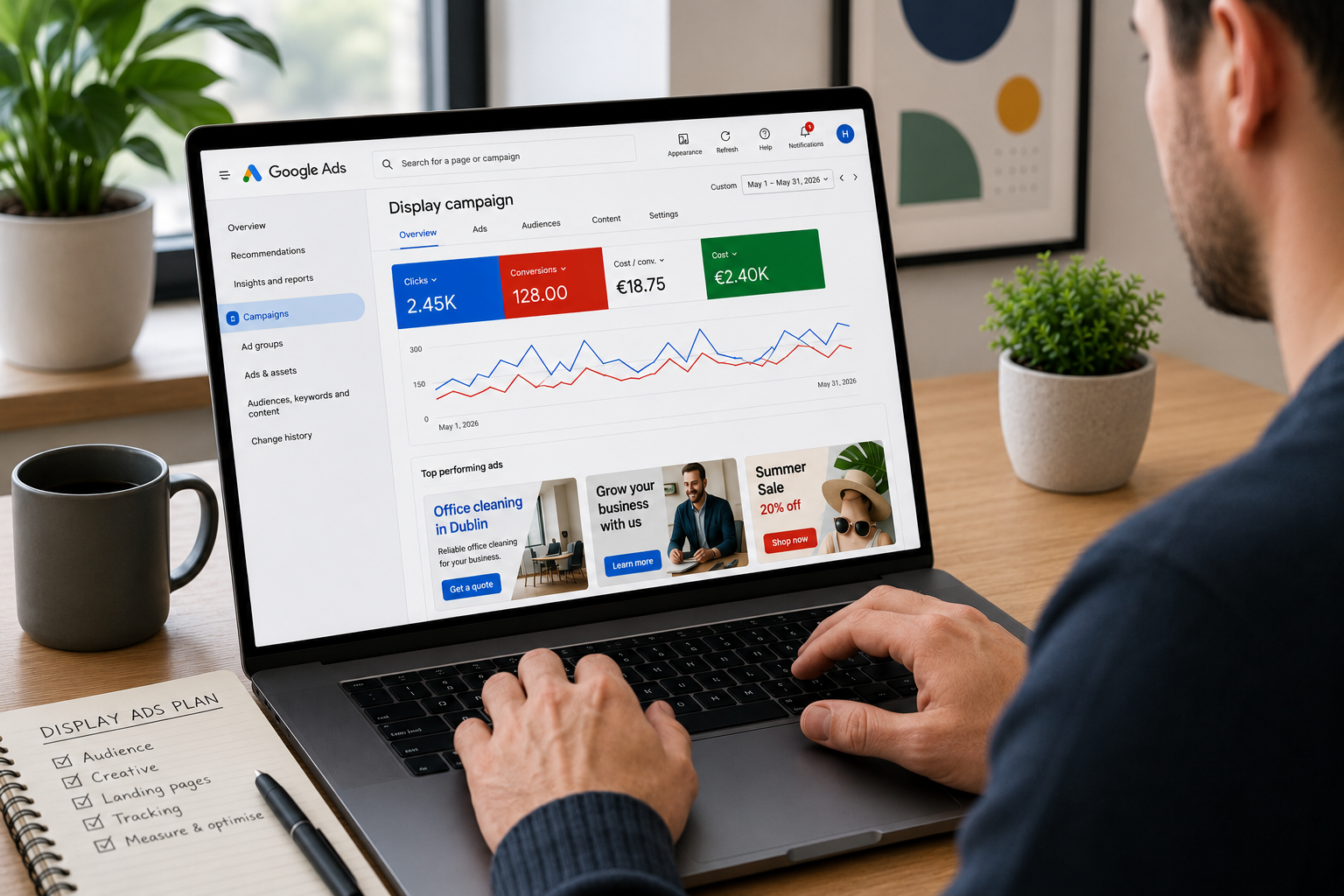

Google display ads allow businesses to reach potential customers while they browse websites, use mobile apps, watch YouTube or check Gmail.
Unlike Google Search ads, which mainly appear in response to an active search, display ads can reach people before they search for a specific business or service.
They can be used to:
Build awareness
Reach new audiences
Re-engage previous website visitors
Promote products or services
Support seasonal offers
Generate enquiries or sales
Stay visible during a longer buying process
Display advertising can give small businesses broad reach, but low-cost impressions and clicks do not automatically make a campaign effective.
The audience, creative, landing page, bidding strategy and conversion tracking must all support the same objective.
Google display ads are visual advertisements shown across the Google Display Network and eligible Google-owned properties. Advertisers provide images, logos, videos, headlines and descriptions, and Google can combine these assets to fit different placements.
Google display ads can appear across websites, mobile apps, YouTube, Gmail and other eligible Google properties.
Display advertising reaches people while they browse content rather than only when they actively search.
Google began moving standalone Display campaigns into Demand Gen in June 2026.
Responsive display ads automatically combine and resize images, logos, headlines and descriptions.
Audience targeting and content targeting serve different purposes and should not be treated as interchangeable.
Prospecting and remarketing should have separate objectives, audiences, messages and reporting.
Optimised targeting can expand beyond the audience signals you select.
Strong display creative uses clear imagery, concise messaging and one relevant call to action.
Frequency should be monitored so that the same users are not shown the same advertising excessively.
View-through conversions require careful interpretation because the person may not have clicked the ad.
Campaign performance should be evaluated against the original objective, not click-through rate alone.
Display advertising works best as part of a clear acquisition, remarketing or awareness strategy.
Google display ads are visual advertisements delivered through the Google Display Network and other eligible Google inventory.
Depending on the campaign and ad format, they can contain:
Images
Logos
Headlines
Descriptions
Video
Product information
A business name
A call to action
Google states that its display inventory includes more than three million websites and over 650,000 apps, alongside Google properties such as Gmail and YouTube.
Display ads can appear in several forms, including:
Banner advertisements
Square or rectangular image ads
Native-style ads that match the surrounding page
Responsive display ads
Uploaded static image ads
Animated HTML5 ads
Dynamic product or service ads
Video-supported responsive ads
The available format depends on the campaign type, inventory and assets supplied.
A display campaign connects five main elements:
The campaign objective
The audience or content being targeted
The advertisement
The available advertising placement
The landing page and conversion action
When an eligible advertising space becomes available, Google evaluates which campaigns can enter the auction.
The system considers factors such as:
Targeting eligibility
Bid or bidding strategy
Predicted performance
Ad quality
Available creative assets
Campaign budget
The person’s context
The website, app or content
Existing exclusions
Frequency settings
If your ad wins the auction, Google displays it in an available format.
Responsive display ads can automatically change their size, appearance and format to fit different placements. A single responsive ad could therefore appear as a small native-style ad on one website and a larger image advertisement elsewhere.
Google display ads can appear across eligible:
Websites
Mobile apps
YouTube placements
Gmail placements
Google Display Network inventory
Other surfaces supported by Demand Gen
Google’s 2026 transition means display inventory is increasingly managed through Demand Gen, which can include YouTube, Discover, Gmail, Maps and the Google Display Network. Channel controls allow advertisers to choose which eligible surfaces to use.
You do not automatically appear on every website or app.
Actual placements depend on:
Campaign settings
Audience targeting
Content targeting
Channel selection
Bid and budget
Inventory availability
Brand-safety settings
Placement exclusions
Google Ads policies
Placement reports should be reviewed regularly, particularly when the campaign is using broad targeting or optimised targeting.
Google began moving Display campaigns into Demand Gen in June 2026.
Eligible advertisers can voluntarily migrate campaigns using the tool available in Google Ads. Google has stated that, at a later stage, new Display campaigns will only be created through Demand Gen and remaining eligible campaigns will be migrated automatically.
The Google Display Network itself is not disappearing.
Instead, its inventory is being incorporated into the wider Demand Gen campaign structure.
This change provides access to:
Google Display Network websites and apps
YouTube
YouTube Shorts
Discover
Gmail
Maps, where available
Image and video formats
Lookalike segments
Channel-level controls
Demand Gen experiments
Businesses with existing Display campaigns should not assume that every setting will transfer without review.
After migration, check:
Campaign status
Budget
Bidding
Conversion goals
Audience targeting
Content targeting
Channel controls
Creative assets
Business name and logo
Exclusions
Frequency settings
Landing pages
Google notes that migrated campaigns may experience short-term performance fluctuations and that ads created through migration must be submitted for approval again.
Display ads can introduce your business to people who have not searched for it before.
This can be useful when:
The business is entering a new market
The service has low search demand
Customers need education before buying
The purchase decision takes time
Visual presentation matters
Brand recognition influences later decisions
An awareness campaign should be assessed using metrics such as reach, frequency, viewable impressions and relevant website engagement.
It should not be judged solely by immediate form submissions.
Display ads can target people based on characteristics, interests, recent research behaviour or the content they are viewing.
This allows a business to introduce an offer before the person searches for a specific provider.
For example, a commercial fit-out company could reach people researching:
Office relocation
Workplace design
Commercial property
Office refurbishment
Facilities management
The campaign still needs a clear reason for those users to engage.
Broad reach without a strong proposition can generate a large number of impressions without producing meaningful commercial results.
Display advertising can show ads to people who have already interacted with your website or app.
Google now refers to these groups as your data segments, although the process is still widely known as remarketing or retargeting. These segments can include previous visitors, product viewers, cart abandoners or other users who completed selected actions.
Someone who viewed a high-value service page may be more valuable than someone who visited the homepage for several seconds.
Remarketing lists should therefore reflect user intent rather than treating every visitor equally.
Display ads can support:
Christmas offers
Summer promotions
Event campaigns
Product launches
Recruitment periods
Time-limited services
Industry exhibitions
Awareness dates
Fundraising campaigns
The creative, audience and landing page should make the timing and offer clear.
Do not continue serving expired promotional creative after the offer ends.
Display advertising can generate direct conversions, particularly when:
The audience has demonstrated relevant intent
The campaign uses strong first-party data
The offer is clear
The landing page is effective
Conversion tracking is accurate
The product or service has a short decision cycle
The campaign has enough budget and data
Cold display traffic is less intentional than a relevant Google Search click.
A person searching “commercial cleaning company Dublin” is actively looking for the service. A person reading an office-management article may be relevant but not ready to make an enquiry.
The expected conversion rate and acquisition cost should reflect this difference.
Responsive display ads are created from separate assets, including:
Images
Logos
Videos
Short headlines
A long headline
Descriptions
A business name
Google combines these assets and adjusts the format to fit available advertising spaces.
Responsive ads offer:
Broad placement coverage
Automatic resizing
Native-style formats
Multiple creative combinations
Easier asset management
Support across mobile and desktop inventory
Every asset should work independently because Google controls which elements appear together.
Responsive display ads can use up to five short headlines, one long headline, five descriptions and multiple image and logo assets.
For the current image sizes, aspect ratios and file requirements, see my guide to Google display ads dimensions.
Uploaded image ads are complete advertisements created outside Google Ads and uploaded at a fixed size.
They provide greater control over:
Layout
Typography
Branding
Image placement
Button design
Supporting text
However, each advertisement only fits placements that support its exact dimensions.
A campaign relying only on uploaded image ads may therefore have less available inventory than one also using responsive assets.
Uploaded ads work well when:
Brand control is strict
The design needs an exact layout
Legal wording must appear in a defined position
The business has professional design resources
The campaign requires specific banner formats
HTML5 ads can include animation and interactive creative elements.
They require more specialist design and must comply with Google’s technical and policy requirements.
They can be useful for:
Product demonstrations
Interactive storytelling
Animated offers
Rich visual sequences
More advanced brand campaigns
They are not automatically better than static or responsive creative.
The format still needs a clear message and conversion objective.
Dynamic display ads use a feed to personalise the products or services shown.
They are most commonly used by:
Ecommerce retailers
Hotels
Travel businesses
Property businesses
Recruitment platforms
Education providers
Businesses with large service catalogues
For example, a retailer can show someone products related to items they previously viewed.
Dynamic campaigns require:
A suitable product or service feed
Accurate website tagging
Correct item identifiers
Relevant audience segments
Current prices and availability
Suitable landing pages
Automation cannot compensate for poor feed data or broken tracking.
Responsive display ads can include video assets uploaded through YouTube.
Video can help explain:
A product
A service process
A customer outcome
A location
A business story
A complex proposition
Keep the message understandable without relying on sound.
Many placements are viewed with the sound muted or while the user is focused on other content.
| Responsive display ads | Uploaded image ads |
|---|---|
| Built from separate assets | Designed as complete fixed-size advertisements |
| Automatically resized and rearranged | Layout remains under the advertiser’s control |
| Can access a broad range of placements | Limited to placements supporting the uploaded dimensions |
| Easier for businesses with limited design resources | Requires separate creative for each selected size |
| Google selects asset combinations | The advertiser controls the composition |
| May appear in native-style formats | Retains a consistent designed format |
| Best for broader coverage and testing | Best for strict design and branding requirements |
Using both can provide broader inventory coverage while retaining controlled creative in priority placements.
Google display advertising offers two broad targeting approaches:
Audience targeting
Content targeting
Audience targeting focuses on who the person is.
Content targeting focuses on where or alongside what content the ad appears.
Google distinguishes between these approaches within its targeting tools.
Your data segments contain people who have already interacted with your business.
They can include:
All website visitors
Visitors to a specific page
Product viewers
Cart abandoners
Previous customers
App users
People who completed or did not complete an action
These audiences are valuable because the users already have some familiarity with the business.
Avoid relying only on an “all visitors” segment.
Create groups based on meaningful behaviour, such as:
Viewed a high-value service
Visited the pricing page
Began a booking process
Added a product to the basket
Purchased within the last six months
Existing customer due for a repeat service
The message should reflect what the person already knows.
Someone who abandoned a basket should not receive the same introduction as someone who has never visited the website.
Custom segments allow you to provide signals based on relevant:
Search terms
Interests
Websites
Apps
These signals help Google identify people with related interests or purchase intentions.
Custom segments should reflect the customer’s actual research behaviour.
A B2B campaign should not simply target broad terms such as “business” or “marketing”. It should use the problems, tools, competitors and topics connected to the service.
In-market segments are designed to reach people Google identifies as actively researching or considering products and services within a category.
They can provide a useful starting point where the available category closely matches the offer.
A broad category may still include many users who are not suitable customers.
Review lead quality rather than assuming that every in-market user has strong commercial intent.
Google Ads can use estimated demographic information, including:
Age
Gender
Parental status
Household income, where available
Detailed demographic characteristics
Restricting demographics can reduce campaign reach. Use exclusions only where there is clear commercial or regulatory justification. Google notes that demographic information may be estimated from Google profiles or publisher data.
Customer Match allows eligible advertisers to use first-party customer data to reach or exclude known users across supported Google properties.
This can support:
Customer retention
Cross-selling
Reactivation
Excluding existing customers from acquisition campaigns
Reaching high-value customer groups
Building more relevant audience signals
Customer data must be collected and used in accordance with Google’s policies and applicable privacy requirements.
Topic targeting places ads alongside content related to selected subject categories.
For example, an Irish gardening supplier could target content related to:
Gardening
Landscaping
Home improvement
Outdoor living
Topic categories are broad.
Use placement reports and exclusions to check where the ads actually appear.
Placement targeting allows you to select specific:
Websites
Apps
YouTube channels
YouTube videos
Other eligible placements
This provides greater control where you know that particular sites or content are relevant to the audience.
A selected placement does not guarantee impressions. The placement must have eligible inventory, and your campaign must still compete in the auction.
Display keywords help Google identify content related to selected themes.
They do not work like Search campaign keywords.
They are used for contextual matching rather than matching an active search query.
For example, keywords around “office interior design” could help a commercial fit-out advertisement appear alongside content discussing office renovations and workplace design.
Google states that ads can appear on content matching any of the topics, placements or Display keywords you target.
Adding a topic and a keyword does not necessarily mean the page must match both criteria.
This is important because advertisers sometimes combine several content settings expecting them to narrow the campaign.
The result may instead increase the number of eligible placements.
Optimised targeting allows Google to look beyond the audience segments or targeting signals you selected and identify additional users considered likely to convert.
Google states that optimised targeting is turned on automatically and can be disabled in the ad group settings. It may also reduce or stop traffic from the original signals if other audiences perform better.
This means the selected audience is not always a strict boundary.
Use optimised targeting when:
Conversion tracking is reliable
The campaign has a clear conversion objective
The business wants to find new customers
There is enough budget to test beyond the initial audience
Lead or sales quality can be assessed
Consider turning it off when:
The campaign must reach a tightly defined group
The budget is very limited
The offer is highly specialised
The campaign is remarketing only
Audience expansion would create compliance issues
Conversion data is weak or misleading
Do not assume that Google will remain within the audience signals you entered.
One of the most common problems I see is a campaign launched because display clicks appear inexpensive.
The business compares a €0.30 display click with a €5 Search click and assumes the display campaign offers better value.
The two clicks represent different levels of intent.
A Search user may be actively looking for the service. A Display user may have been reading an article, checking an app or watching a video when the ad interrupted their activity.
The lower-cost click is not automatically the better commercial result.
Another recurring issue is combining cold audience targeting and remarketing in the same campaign.
These users require different messages:
A new audience needs an introduction and reason to care.
A previous visitor may need reassurance, evidence or a stronger offer.
A cart abandoner may need product-specific messaging.
An existing customer may need a repeat-purchase or cross-sell message.
I also see businesses rely heavily on view-through conversions without checking whether those conversions would have happened anyway.
A display ad may have contributed to a sale without generating a click, but the attribution window and the user’s previous relationship with the business must be considered.
Finally, many accounts use one image, one generic headline and an “all visitors” audience. This gives Google little useful creative or strategic information.
Start with a specific objective.
Examples include:
Reach 50,000 relevant people in Dublin
Generate consultation requests from previous service-page visitors
Re-engage cart abandoners
Promote a seasonal sale
Introduce a new product range
Increase repeat purchases
Generate leads from a defined B2B audience
Avoid vague objectives such as:
Get more exposure
Increase visibility
Drive traffic
Promote the business
The objective determines the targeting, creative, bidding and measurement.
Use separate campaigns or clearly separated structures for:
New audiences
Previous website visitors
Cart abandoners
Existing customers
This allows you to control:
Budget
Frequency
Creative
Offers
Landing pages
Bidding
Reporting
Combining these audiences can make performance look stronger because familiar users often convert more easily than cold prospects.
An Irish business should target the areas it can actually serve.
Depending on the offer, this could include:
Dublin
Selected counties
The Republic of Ireland
A radius around the business
Ireland and Northern Ireland
Selected international markets
Do not target all of Ireland merely to increase reach.
A local clinic, tradesperson or professional service should focus on commercially realistic areas.
The campaign needs enough budget to reach the audience repeatedly and produce useful data.
The right budget depends on:
Audience size
Campaign duration
Geographic coverage
Creative formats
Expected cost per thousand impressions
Expected cost per click
Conversion rate
Value of the conversion
Remarketing-list size
Frequency objective
For more detail on campaign costs, see my guide to how much Google Ads cost.
Do not divide a limited budget across too many audiences, locations and offers.
Your bidding strategy should match the campaign goal.
For example:
Awareness campaigns may focus on viewable impressions or reach.
Traffic campaigns may focus on clicks.
Lead-generation campaigns may use Maximise conversions or target CPA.
Ecommerce campaigns may use Maximise conversion value or target ROAS.
Do not use conversion-focused automated bidding before confirming that the conversion action is accurate and valuable.
An automated strategy will optimise towards whatever you define as success, even if that action is only a weak button click or contact-page view.
Depending on the campaign, consider:
Content exclusions
Placement exclusions
App-category exclusions
Geographic exclusions
Audience exclusions
Existing customer exclusions
Converted-user exclusions
Sensitive-content settings
Brand-safety controls reduce unsuitable placements but do not eliminate the need to review placement reports.
Frequency measures how often the same person sees your advertising.
High frequency can lead to:
Creative fatigue
Annoyance
Declining engagement
Wasted impressions
Negative brand perception
Google Ads allows Display advertisers to set frequency caps at campaign, ad-group or ad level over a day, week or month.
There is no universal ideal frequency.
The appropriate level depends on:
Campaign duration
Audience size
Buying cycle
Creative variety
Offer
Brand familiarity
Awareness versus direct-response objective
Review average impression frequency per user and performance over time.
The image should explain the offer or create a clear connection to it.
Suitable images could show:
The product
The service being delivered
A customer outcome
The business location
A completed project
A staff member
The product in use
A relevant professional setting
Avoid generic imagery that could represent any business.
A photograph of people shaking hands says little about an accountant, consultant, software platform or construction company.
Responsive campaigns need assets that work across different shapes and devices.
Provide:
Landscape images
Square images
Vertical images where supported
Square logos
Landscape logos
Video where relevant
Do not use one image and rely on automatic cropping for every placement.
The current specifications and fixed banner sizes are covered in my Google display ads dimensions guide.
A display ad is often seen while the person is focused on something else.
The message should quickly explain:
What is offered
Who it is for
The main benefit
The next action
For example:
Headline: Commercial cleaning in Dublin
Description: Flexible cleaning plans for offices, clinics and shared workspaces.
This is clearer than:
Headline: A cleaner future starts today
Description: Discover a new world of possibility with our trusted team.
Creative language should not obscure the offer.
Suitable display calls to action include:
Request a quote
Book a consultation
Shop now
View the collection
Check availability
Download the guide
Register today
Learn more
“Learn more” works when the campaign is educational or awareness-led.
For a high-intent remarketing campaign, a more direct action may be appropriate.
Google can combine responsive assets in different ways.
Do not rely on one headline to complete another.
Avoid assets such as:
Headline 1: Save 20%
Headline 2: This weekend only
Headline 3: On selected products
Each line may appear without the others.
Use complete assets:
Save 20% on selected products
Weekend sale now available
Shop selected products online
Creative fatigue can reduce performance as the same audience repeatedly sees the same advertisements.
Review:
Frequency
Reach
Click-through rate
Conversion rate
Cost per conversion
Asset reporting
Performance by audience
Performance by placement
Replace creative when the data indicates deterioration, not simply because a calendar reminder says that four weeks have passed.
The landing page should continue the message introduced in the advertisement.
It should match:
The product or service
The audience
The offer
The location
The visual style
The call to action
A person clicking an ad for a free website audit should arrive on a page explaining that audit.
They should not arrive on a general homepage listing every service.
A strong landing page should include:
A clear heading
A concise explanation
Relevant benefits
Supporting evidence
A visible call to action
Mobile usability
Fast loading
Appropriate consent information
Accurate conversion tracking
Improving the landing page can have a greater effect on the campaign’s conversion rate than making minor adjustments to banner colours or button wording.
The conversion action should reflect a meaningful business outcome.
Depending on the campaign, this could include:
A completed enquiry form
A qualified phone call
A confirmed booking
A purchase
A registration
A download
A product trial
An offline sale linked back to the campaign
Do not treat every interaction as a primary conversion.
Actions such as these may be useful for analysis but should not automatically drive bidding:
Contact-page views
Email-link clicks
Short website visits
Video plays
Scroll depth
Add-to-basket events without purchase
Form starts without completion
Test the conversion before allowing automated bidding to optimise towards it.
The correct metrics depend on the campaign objective.
Review:
Reach
Unique users
Impressions
Viewable impressions
Frequency
Cost per thousand impressions
Relevant website engagement
Branded search changes
Assisted conversions
Review:
Clicks
Click-through rate
Cost per click
Engaged sessions
Landing-page engagement
Bounce or engagement rate
Quality of website visits
Subsequent conversions
Review:
Qualified leads
Cost per qualified lead
Conversion rate
Lead quality
Sales opportunities
Closed revenue
Audience performance
Placement performance
Review:
Purchases
Revenue
Return on ad spend
Cost per purchase
Average order value
New customer revenue
Repeat customer revenue
Product-level performance
Clicks and click-through rate are diagnostic metrics.
They do not prove that the campaign is profitable.
A view-through conversion occurs when someone sees a display or video ad, does not click it, and later completes a conversion.
These conversions can help identify the influence of visual advertising where users do not immediately click.
However, the result depends on the selected view-through conversion window. A longer window normally records more view-through conversions.
Review view-through conversions separately from click-through conversions.
Ask:
Was the person already familiar with the business?
Were they also exposed to Search, social or email activity?
Did they visit the website before seeing the display ad?
How long is the attribution window?
Is the campaign reaching existing customers?
Would the conversion probably have happened anyway?
View-through reporting is useful, but it should not be treated as proof that every attributed conversion was caused by the display impression.
| Google display ads | Google Search ads |
| Reach people while they browse content | Reach people while they search |
| Visual and asset-led | Primarily text-led |
| Useful for awareness and remarketing | Strong for active demand |
| Uses audience and content targeting | Uses search keywords and intent |
| Can generate large reach | Usually produces lower reach but stronger immediate intent |
| Often has lower click costs | Click costs can be higher |
| Requires strong visual creative | Requires relevant search copy |
| Performance may include view-through influence | Performance is more directly click-led |
The two formats support different stages of the buying journey.
A small business should not replace a profitable Search campaign with Display solely because display clicks cost less.
For businesses capturing active demand, Google Ads Search campaigns often remain the stronger starting point.
Display can then support:
Remarketing
Awareness
Product launches
Longer sales cycles
Audience development
Seasonal activity
Both formats allow businesses to use visual creative and audience targeting.
Google display ads can reach people across websites, apps and Google-owned inventory.
Paid social ads reach people within social platforms and use the behaviours, interests and content available within those ecosystems.
The right channel depends on:
Where the audience spends time
The quality of available targeting
Creative format
Campaign objective
Available conversion data
Product or service category
Audience intent
Budget
The same image and message should not automatically be copied across every advertising platform.
Each channel has different formats, environments and user expectations.
Display ads can work well for:
Ecommerce retailers
Travel businesses
Hotels
Events
Charities
Training providers
Clinics
Property businesses
B2B services with long sales cycles
Businesses with strong visual products
Businesses with enough website traffic for remarketing
Businesses launching new products or services
They may be less suitable when:
The budget is too limited to test the campaign properly
There is no clear target audience
The business lacks suitable creative assets
The website does not generate conversions
Conversion tracking is unreliable
The service has strong existing search demand but Search is not being funded
The campaign objective is simply to generate cheap traffic
The business cannot assess lead quality
The audience is too small
The landing page does not match the advertisement
Display advertising should solve a defined marketing problem.
It should not be added simply because the campaign type is available.
| Mistake | Why it causes problems | What to do instead |
| Running display solely because clicks are cheap | Low-cost traffic may have weak commercial intent | Evaluate leads, sales and assisted value |
| Combining prospecting and remarketing | Familiar and new users require different strategies | Separate budgets, audiences, creative and reporting |
| Targeting all website visitors | The audience includes people with very different intent | Build segments around meaningful behaviour |
| Leaving optimised targeting unchecked | Google may expand beyond the selected audiences | Review the setting and resulting audience performance |
| Using one generic image | The creative may not fit placements or communicate the offer | Supply several relevant aspect ratios and concepts |
| Adding too much text | The message becomes unreadable in smaller placements | Use one clear proposition and call to action |
| Sending every ad to the homepage | The landing page does not continue the ad message | Use a relevant product, service or campaign page |
| Ignoring placement reports | Ads may spend on irrelevant websites or apps | Review placements and apply exclusions |
| Ignoring frequency | The same audience may see the ad excessively | Monitor frequency and use caps where appropriate |
| Treating view-through conversions as clicks | Impression-based attribution can overstate impact | Review view-through results separately |
| Using weak conversion actions | Automated bidding optimises towards low-value behaviour | Use meaningful primary conversions |
| Changing targeting and creative together | It becomes difficult to identify what affected performance | Test controlled variables |
| Measuring click-through rate alone | Engaging creative may still attract poor-quality traffic | Measure commercial outcomes |
| Ignoring the Demand Gen transition | Campaign settings and inventory controls are changing | Review migration notices and post-migration settings |
Before launching a campaign, confirm that:
The campaign has one defined objective.
Prospecting and remarketing are separated.
Location targeting reflects the areas the business serves.
Conversion tracking has been tested.
Primary conversions represent meaningful outcomes.
Audience and content targeting have been reviewed.
Optimised targeting is configured intentionally.
Placement and content exclusions are in place.
Landscape, square and mobile-friendly assets are available.
Headlines and descriptions work in different combinations.
The landing page matches the offer.
Frequency will be monitored.
View-through conversions will be reported separately.
Lead or sales quality can be assessed.
Display or Demand Gen migration settings have been reviewed.
Google display ads are visual advertisements shown across websites, mobile apps, YouTube, Gmail and other eligible Google inventory.
They can use images, logos, video, headlines and descriptions.
Advertisers define a campaign objective, targeting, budget and bidding strategy, then supply creative assets.
Google enters eligible ads into auctions for available placements and displays the winning advertisement in a suitable format.
They can appear across the Google Display Network, which includes websites and mobile apps, as well as eligible placements across YouTube, Gmail and other Google surfaces.
The exact placements depend on campaign type, targeting, exclusions and inventory.
Yes.
Google began allowing eligible advertisers to migrate Display campaigns into Demand Gen in June 2026. Google has stated that new Display campaigns will later be created through Demand Gen and remaining eligible campaigns will be migrated automatically.
Display ads reach people while they browse content and use visual creative.
Search ads primarily reach people who are actively entering relevant searches on Google.
Search normally reflects stronger immediate intent, while Display is useful for awareness, prospecting and remarketing.
Yes.
You can create your data segments containing people who previously visited your website or completed selected actions.
You can then show these users relevant advertisements across eligible Google inventory.
Display campaigns can use keywords for contextual targeting.
These keywords help Google find relevant content and placements. They do not work like Search campaign keywords and do not require someone to enter the phrase into Google.
There is no fixed cost.
The amount depends on:
Audience
Locations
Placements
Competition
Campaign objective
Bidding strategy
Creative
Conversion rate
Available budget
Campaigns can be billed and optimised using different approaches, including clicks, impressions and conversions, depending on the campaign and bidding settings.
There is no universal target.
Click-through rate varies by audience, format, placement, objective and industry.
A high click-through rate is not valuable if the clicks do not become qualified leads, sales or meaningful website engagement.
They can be effective when the campaign has a clear objective, relevant targeting, suitable creative, a strong landing page and accurate tracking.
They are less effective when they are used only to generate inexpensive traffic.
Change creative when performance and frequency data show fatigue or when the offer becomes outdated.
Do not replace ads according to a fixed schedule without reviewing actual campaign evidence.
Responsive display ads provide broader placement coverage and require fewer fixed designs.
Uploaded image ads provide greater control over the exact composition.
Using both can balance reach and creative control.
Build awareness, reconnect with previous visitors and reach potential customers beyond Google Search.
If your display campaigns are generating impressions and clicks but not enough qualified leads or sales, I can help you identify where the budget is being wasted.
Book a free consultation and I will review your campaign structure, audience targeting, creative assets, placements, landing pages and conversion tracking. I will identify the main issues and show you what to prioritise first.
Alessandro Boscolo Conway — Hello Digital
I'm a Dublin-based freelance SEO and digital marketing consultant with over 20 years of experience, including time on Google Ireland’s Search Quality team.
I run Hello Digital, a consultancy that helps startups and small businesses across Ireland grow online through clear strategy, expert delivery, and practical support.
I've worked with over 50 Irish companies to improve their visibility, generate better leads, and grow sustainably through SEO and digital marketing.
I'm a certified Google Partner and a trusted advisor to e-commerce brands, local services, and fast-growing startups.
- Based in Dublin, 20+ years of experience
- Former Googler, certified Google Partner, SEO strategist, and performance marketer
- Trusted by 50+ Irish startups, e-commerce brands, and local businesses
- Learn more about Hello Digital