

SEO
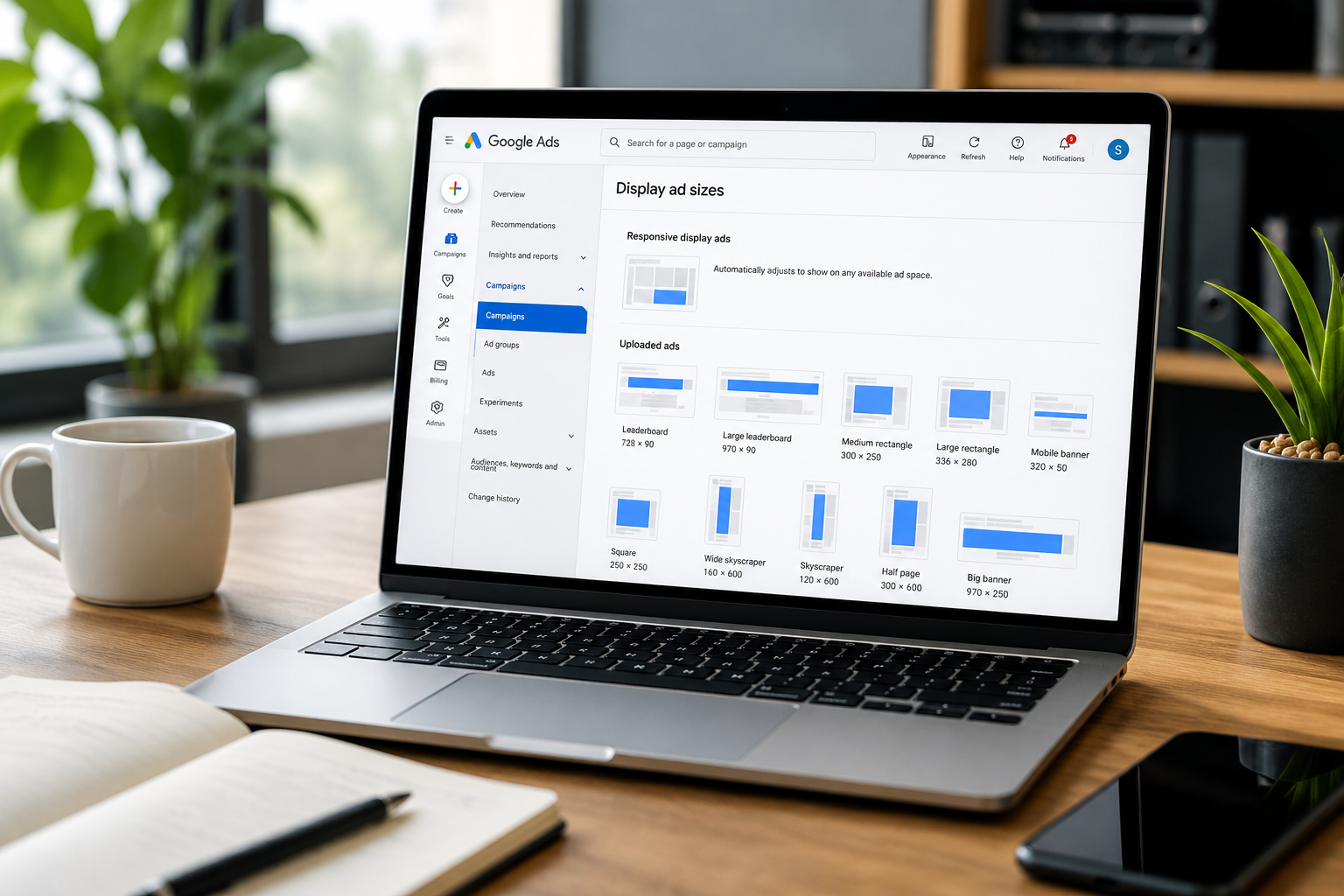

Using the correct Google display ads dimensions helps your images appear clearly across websites, mobile apps, Gmail, YouTube and other eligible Google placements.
The required dimensions depend on whether you are creating:
Responsive display ads using separate images, logos and text assets
Uploaded display ads designed at fixed pixel sizes
Display inventory within a Demand Gen campaign
For most small businesses in Ireland, responsive display ads provide the broadest placement coverage because Google automatically adapts the supplied assets to different ad spaces.
Uploaded display ads provide greater creative control, but each file only fits placements that support its exact dimensions.
This guide explains the current Google display ads dimensions, file requirements and design practices you should follow.
The main responsive Google display ad image sizes are 1200 × 628 pixels for landscape images and 1200 × 1200 pixels for square images. For uploaded static display ads, commonly used dimensions include 300 × 250, 336 × 280, 728 × 90, 300 × 600 and 320 × 50 pixels.
Use 1200 × 628 pixels for landscape responsive display ad images.
Use 1200 × 1200 pixels for square responsive display ad images.
A vertical 9:16 image at 900 × 1600 pixels can provide additional mobile coverage.
Upload both square and landscape logos where possible.
Responsive display ads automatically adapt your assets to different available placements.
Uploaded display ads require separate files for each fixed dimension.
The most useful uploaded sizes include 300 × 250, 336 × 280, 728 × 90, 300 × 600 and 320 × 50 pixels.
Static uploaded image ads must be no larger than 150 KB.
Images should remain understandable when cropped or displayed at small sizes.
Google began rolling out the migration of Display campaigns into Demand Gen in June 2026, so advertisers should review the campaign options available in their accounts.
Google display ads are visual advertisements that can appear while people browse websites, use mobile apps, watch YouTube, check Gmail or use other eligible Google services.
Unlike Google Search ads, which respond primarily to active searches, display advertising can reach people while they are consuming other online content.
Display ads can be used to:
Build awareness
Re-engage previous website visitors
Promote products or services
Support seasonal campaigns
Reach selected audience groups
Generate leads or sales
Remind potential customers about an offer
You manage these ads through Google Ads.
Google states that display inventory reaches more than three million websites and over 650,000 apps, as well as Google properties such as Gmail and YouTube.
Google display ads are moving into Demand Gen.
Google began a phased rollout of its migration tool in June 2026. Eligible advertisers can use the tool to migrate existing Display campaigns into Demand Gen while retaining up to 42 days of performance history. Google has also stated that, at a later stage, new Display campaigns will only be created through Demand Gen and remaining eligible campaigns will be migrated automatically.
This does not mean that Google Display Network inventory is disappearing.
Demand Gen can include placements across:
The Google Display Network
YouTube
YouTube Shorts
Discover
Gmail
Maps
Advertisers can use channel controls to decide which eligible surfaces should be included.
If you are creating or updating a campaign, check whether your account still presents a standalone Display campaign option or directs you towards Demand Gen.
The image dimensions in this guide remain relevant because Demand Gen supports responsive display ads and uploaded static display ads for Google Display Network inventory. At the time of review, uploaded HTML5 display ads are scheduled to become available in Demand Gen later in 2026.
There are two main ways to supply display creative.
| Responsive display ads | Uploaded display ads |
|---|---|
| You provide separate images, logos, headlines and descriptions | You upload a completed ad at a fixed size |
| Google combines and resizes the assets | The design appears largely as supplied |
| Ads can fit a broad range of placements | Ads can only serve in placements supporting the uploaded size |
| Easier for small businesses with limited design resources | Better for strict brand or layout control |
| Creative combinations are selected automatically | Each size must be designed and uploaded separately |
| Assets may be cropped or rearranged | The composition remains fixed |
Responsive display ads are the default Display Network format and can adjust their size, appearance and format to fit available advertising spaces.
Uploaded display ads are useful when the exact design, typography and placement of every visual element must remain under your control.
Many campaigns benefit from using both formats. Responsive ads increase placement coverage, while uploaded ads provide controlled designs for the most important fixed sizes.
Responsive display ads use separate image and logo assets rather than complete banners.
| Asset | Aspect ratio | Recommended dimensions | Minimum dimensions | Quantity |
| Landscape image | 1.91:1 | 1200 × 628 px | 600 × 314 px | 1 to 15 |
| Square image | 1:1 | 1200 × 1200 px | 300 × 300 px | 1 to 15 |
| Vertical image | 9:16 | 900 × 1600 px | 600 × 1067 px | Up to 15 |
| Square logo | 1:1 | 1200 × 1200 px | 128 × 128 px | Up to 5 |
| Landscape logo | 4:1 | 1200 × 300 px | 512 × 128 px | Up to 5 |
Google recommends supplying several image assets in each main aspect ratio rather than relying on one image. Landscape and square marketing images are required, while vertical images and logos increase creative coverage. Each image file can be up to 5,120 KB.
The landscape image uses a 1.91:1 aspect ratio.
This format is suitable for:
Wide display placements
Native-style placements
Desktop layouts
Content feeds
Wider mobile placements
The recommended size is 1200 × 628 pixels, with a minimum of 600 × 314 pixels.
Keep the main subject near the centre because Google may crop the image to suit different placements.
The square image uses a 1:1 aspect ratio.
It is one of the most versatile formats because it can work across both desktop and mobile placements.
The recommended size is 1200 × 1200 pixels, with a minimum of 300 × 300 pixels.
Do not simply crop a landscape photograph into a square without checking the final composition. Create or select an image where the product, person or main subject remains clear in the square frame.
The vertical format uses a 9:16 aspect ratio.
Google recommends 900 × 1600 pixels, with a minimum of 600 × 1067 pixels.
Vertical images are not required for a standard responsive display ad, but they can help the campaign use mobile-first placements more effectively.
Use a composition designed specifically for vertical space. Do not place the important subject at the far top or bottom of the image.
The square logo uses a 1:1 aspect ratio.
Google recommends 1200 × 1200 pixels, with a minimum of 128 × 128 pixels.
Keep the logo centred and allow enough breathing room around it. Avoid including taglines or small wording that will become unreadable when the logo is reduced.
The landscape logo uses a 4:1 aspect ratio.
Google recommends 1200 × 300 pixels, with a minimum of 512 × 128 pixels.
A landscape logo can work better in horizontal placements where a square logo would appear too small.
Provide both logo formats where possible.
Responsive display ads also require text assets.
| Asset | Maximum length | Quantity |
| Short headline | 30 characters | 1 to 5 |
| Long headline | 90 characters | 1 |
| Description | 90 characters | 1 to 5 |
| Business name | 25 characters | 1 |
Google may combine these assets in different orders and formats. Every headline and description should make sense individually and alongside the other assets.
Do not write five versions of the same headline.
Use the available assets to communicate different information, such as:
The product or service
The target audience
The main benefit
The offer
The business location
The call to action
A trust signal
For example, a Dublin accountancy firm could use:
Small business accountants
Dublin-based accounting team
Fixed-fee accounting support
Book an initial consultation
Tax and payroll advice
Each phrase adds something different.
Uploaded display ads are complete image advertisements created at fixed dimensions.
The supported sizes include the following.
| Name | Dimensions |
| Small square | 200 × 200 px |
| Vertical rectangle | 240 × 400 px |
| Square | 250 × 250 px |
| Triple widescreen | 250 × 360 px |
| Inline rectangle | 300 × 250 px |
| Large rectangle | 336 × 280 px |
| Netboard | 580 × 400 px |
| Name | Dimensions |
| Skyscraper | 120 × 600 px |
| Wide skyscraper | 160 × 600 px |
| Half-page ad | 300 × 600 px |
| Portrait | 300 × 1050 px |
| Name | Dimensions |
| Banner | 468 × 60 px |
| Leaderboard | 728 × 90 px |
| Top banner | 930 × 180 px |
| Large leaderboard | 970 × 90 px |
| Billboard | 970 × 250 px |
| Panorama | 980 × 120 px |
| Name | Dimensions |
| Mobile banner | 300 × 50 px |
| Mobile banner | 320 × 50 px |
| Large mobile banner | 320 × 100 px |
Uploaded static image ads can use GIF, JPG or PNG files and must be no larger than 150 KB. Animated GIFs must stop after 30 seconds and run at fewer than five frames per second.
You do not need to create every available dimension for every campaign.
For most small businesses, I would prioritise:
300 × 250 pixels
336 × 280 pixels
728 × 90 pixels
300 × 600 pixels
160 × 600 pixels
320 × 50 pixels
320 × 100 pixels
970 × 90 pixels
These cover a useful mix of:
Rectangular content placements
Desktop banners
Vertical desktop placements
Mobile banners
Google also identifies 300 × 250, 336 × 280, 728 × 90, 970 × 90, 160 × 600, 300 × 600 and 320 × 50 as common recommended dimensions for uploaded display creative.
The exact priority should depend on your audience, campaign data and available design resources.
Do not invest heavily in creating every possible size before confirming that the campaign strategy, audience targeting and conversion tracking are correct.
The 300 × 250 format is one of the most useful uploaded display sizes.
It can appear within page content and across both desktop and mobile environments.
Its relatively balanced proportions provide enough room for:
A clear product or service image
A short headline
A logo
A call to action
Avoid trying to fit a full paragraph into the available space.
The 336 × 280 format provides slightly more visual space than the 300 × 250 rectangle.
It can work well for product-led visuals, simple offers and remarketing creative.
Do not assume that the larger rectangle will automatically perform better. Placement availability and audience relevance matter more than the small difference in size.
The 728 × 90 leaderboard is a wide desktop format.
It suits:
Short messages
Brand-led campaigns
Simple offers
Event promotion
Remarketing reminders
The limited height means the headline, logo and call to action must remain concise.
Avoid using detailed photography where the subject becomes too small to understand.
The 300 × 600 format provides more space for visual storytelling.
It can accommodate:
A strong hero image
A headline
Supporting benefit
Logo
Call to action
The extra space does not mean that every part of the ad should be filled.
A clear hierarchy remains more effective than a crowded design.
The 160 × 600 format is narrow and vertical.
It works best with:
A vertically oriented visual
A short headline
Limited supporting text
A clearly separated call to action
Standard landscape photography often crops poorly into this format. Use creative designed for the narrow proportions.
The 320 × 50 format offers very limited space.
Use it for:
A short headline
A recognisable logo
A simple offer
A concise call to action
Do not shrink a complex desktop banner to this size.
The 320 × 100 format provides more room than the standard mobile banner while remaining suitable for small screens.
It can support:
A small product image
A short benefit
A clear call to action
Basic branding
Check the ad on an actual phone-sized screen before approving it.
One of the most common problems I see is a business creating one landscape image and expecting it to work across every placement.
The same image may look acceptable at 1200 × 628 pixels but fail when cropped into a square or vertical format.
Another recurring issue is trying to reproduce an entire website banner inside a small display ad. The result often includes:
A long headline
Several benefits
Contact information
A logo
A button
Multiple product images
Additional promotional wording
At mobile banner size, none of these elements remains clear.
I also see campaigns where considerable time has been spent designing banners before the business has established:
Who the audience is
What action the ad should generate
Which landing page should be used
How conversions will be measured
Whether the campaign is focused on awareness, remarketing or direct response
Correct dimensions cannot compensate for an unclear campaign objective.
The image should have one obvious point of focus.
This could be:
A product
A person using the service
A location
A completed project
A relevant business setting
Avoid collages and images containing several competing subjects.
Google may crop responsive assets to suit different placements.
Keep important visual elements away from the extreme edges.
Do not place:
Faces against the frame
Products partly outside the image
Logos in the corners
Essential information within the image itself
Small details that only work at full size
Preview the image in square, landscape and vertical formats.
Responsive display ads already include separate headline and description assets.
Text embedded into the image may become unreadable when the image is resized or cropped.
Google’s creative guidance advises against overlaid text, collages, borders, excessive filters and distorted imagery.
If wording must form part of an uploaded fixed-size ad, keep it short and large enough to read at the actual display size.
Use clear images that accurately represent your business, product or service.
Avoid:
Blurred images
Low-resolution screenshots
Stretched photographs
Excessive filters
Generic images unrelated to the offer
Images containing watermarks
Misleading before-and-after comparisons
Visuals that do not match the landing page
The image should help the person understand the offer before reading the text.
Uploading several near-identical crops gives Google limited creative variety.
Provide images that test different approaches, such as:
Product-only photography
A product in use
A customer or staff member
A close-up detail
A wider contextual scene
A benefit-focused visual
A service outcome
Every image must still relate clearly to the same campaign or ad group.
Display ads are often seen while the user is doing something else.
The message must therefore be understandable quickly.
A strong display ad should communicate:
What is being offered
Who it is for
Why it matters
What the person should do next
Examples of direct headlines include:
Book a free consultation
Office cleaning in Dublin
Shop commercial tableware
Plan your business exit
Improve your Google Ads results
Avoid headlines such as:
Welcome to our website
Find out more
Quality you can trust
We are here to help
Your trusted partner
These phrases do not explain the actual offer.
Descriptions should add information rather than repeat the headline.
For example:
Headline: Office cleaning in Dublin
Description: Flexible commercial cleaning plans for offices, clinics and shared workspaces.
The call to action must match the destination page.
Do not use “Shop now” when the page only contains an enquiry form.
The ad dimensions and design may earn attention, but the landing page must generate the result.
The destination page should match:
The product or service shown
The headline
The offer
The audience
The location
The call to action
Someone clicking an ad for commercial cleaning in Dublin should not arrive on a generic homepage covering several unrelated services.
A strong landing page should include:
A clear heading
Relevant visuals
A concise explanation of the offer
Benefits
Trust signals
A visible call to action
Mobile usability
Fast loading
Accurate tracking
Appropriate privacy and consent information
A weak landing page can reduce the campaign’s conversion rate, regardless of how well the creative is designed.
Responsive display ads remain relevant for Google Display Network inventory during the migration into Demand Gen.
Demand Gen also supports other visual formats and can distribute creative across additional Google surfaces.
The best choice depends on whether you need:
Display Network placements only
Broader Google visual inventory
Image, video or carousel formats
Strict channel control
Remarketing
Lookalike audiences
Direct-response optimisation
Brand awareness
Do not select Demand Gen simply because it is newer.
Start with the campaign objective, audience, creative resources, tracking and budget.
A PPC management strategy should determine the campaign type, not the other way around.
Do not judge an image after a small number of impressions.
Test controlled differences, such as:
Product image versus lifestyle image
Person-led versus product-led creative
Benefit headline versus offer headline
Square versus vertical creative
Direct call to action versus softer call to action
Brand-led versus problem-led messaging
Avoid changing the audience, bidding, landing page and creative at the same time.
Evaluate:
Conversions
Cost per conversion
Conversion value
View-through conversions where relevant
Assisted conversions
Click-through rate
Landing-page engagement
Performance by placement
Performance by device
Frequency
Reach
A high click-through rate does not prove that the ad is commercially effective. A visually striking image can attract irrelevant clicks.
| Mistake | Why it causes problems | What to do instead |
| Creating only one image size | The image may crop poorly or miss placements | Supply landscape, square and vertical assets |
| Shrinking desktop creative for mobile | Text and products become unreadable | Design mobile banners separately |
| Adding too much text | The message becomes difficult to understand | Use one headline, one clear benefit and one CTA |
| Placing text inside responsive images | Cropping and resizing can make it unreadable | Use Google’s separate text assets |
| Using generic stock photography | The ad does not explain the actual offer | Use relevant product, service or business imagery |
| Uploading near-identical assets | Google has little meaningful creative variety | Test genuinely different visual approaches |
| Ignoring logo formats | Branding may display poorly | Provide square and landscape logos |
| Designing before defining the objective | The creative has no clear purpose | Establish the audience, offer and conversion first |
| Sending ads to the homepage | The destination may not match the message | Use a relevant product, service or landing page |
| Measuring clicks only | Attention may not produce commercial results | Track leads, sales and conversion value |
| Using every possible uploaded size | Design time is spent on low-priority formats | Start with the most useful dimensions |
| Ignoring the Demand Gen transition | Campaign options and controls may change | Review migration notices and account settings |
Before launching your campaign, confirm that:
Landscape images are 1200 × 628 pixels.
Square images are 1200 × 1200 pixels.
Vertical images are 900 × 1600 pixels where used.
Square and landscape logos are available.
Uploaded ads use supported fixed dimensions.
Uploaded static image files are below 150 KB.
Images remain clear when cropped.
Text is readable at the actual display size.
The ad message matches the landing page.
Conversion tracking has been tested.
Mobile previews have been reviewed.
Your account’s Display or Demand Gen campaign options have been checked.
For responsive display ads, use:
1200 × 628 pixels for landscape images
1200 × 1200 pixels for square images
900 × 1600 pixels for optional vertical images
1200 × 1200 pixels for square logos
1200 × 300 pixels for landscape logos
For uploaded display ads, common sizes include 300 × 250, 336 × 280, 728 × 90, 300 × 600, 160 × 600 and 320 × 50 pixels.
There is no single best size.
For responsive display ads, supply both square and landscape images so Google can adapt the creative to available placements.
For uploaded display ads, 300 × 250 pixels is one of the most versatile sizes, but it should be supported by additional desktop and mobile formats.
Use 1200 × 628 pixels for a landscape image and 1200 × 1200 pixels for a square image.
Google accepts smaller minimum dimensions, but larger source images provide more flexibility and visual clarity.
No.
A vertical 9:16 image is optional, but it can improve coverage across mobile-first placements.
Each responsive display image can be up to 5,120 KB.
Uploaded static image ads must be no larger than 150 KB.
You can use the same campaign concept, branding and offer, but the layout should be adapted to each proportion.
A design created for 728 × 90 pixels will not work effectively when reduced or cropped to 300 × 600 pixels.
Responsive display ad images should avoid embedded text because Google combines them with separate headline and description assets.
Uploaded fixed-size ads can contain text, but it must remain concise and readable at the actual display size.
Google is moving Display campaigns into Demand Gen rather than removing Google Display Network advertising.
The phased migration began in June 2026. Existing campaigns can still be edited until they are migrated, while future campaign creation will move into Demand Gen.
Yes.
Small businesses can use display ads for remarketing, awareness, seasonal promotion and lead generation.
The campaign still requires a clear audience, relevant creative, a suitable landing page and accurate conversion tracking.
Reach potential customers with display creative designed for the devices and placements they actually use.
If you are unsure which dimensions, formats or campaign type to use, or if your display campaigns are generating impressions without enough leads or sales, I can help you identify what needs to change.
Book a free consultation and I will review your creative assets, campaign setup, audience targeting, landing pages and conversion tracking. I will identify the main issues and show you what to prioritise first.
Alessandro Boscolo Conway — Hello Digital
I'm a Dublin-based freelance SEO and digital marketing consultant with over 20 years of experience, including time on Google Ireland’s Search Quality team.
I run Hello Digital, a consultancy that helps startups and small businesses across Ireland grow online through clear strategy, expert delivery, and practical support.
I've worked with over 50 Irish companies to improve their visibility, generate better leads, and grow sustainably through SEO and digital marketing.
I'm a certified Google Partner and a trusted advisor to e-commerce brands, local services, and fast-growing startups.
- Based in Dublin, 20+ years of experience
- Former Googler, certified Google Partner, SEO strategist, and performance marketer
- Trusted by 50+ Irish startups, e-commerce brands, and local businesses
- Learn more about Hello Digital