

SEO


A step-by-step guide to claiming, optimising, and managing your Google Business Profile to attract more clients to your Irish law firm.
When someone searches for "solicitor near me" or "conveyancing solicitor Dublin," Google displays a map with three local businesses before showing any website results. This is the Local Pack, and appearing here can be the difference between a steady flow of enquiries and being invisible to potential clients.
In Dublin's competitive legal market, where dozens of firms serve overlapping areas, appearing in the Local Pack can be the difference between a full client book and an empty diary.
Your Google Business Profile (GBP) determines whether you appear in these local results. It's free to set up, yet many solicitor firms either haven't claimed theirs or have left it incomplete. For most small law firms in Ireland, a well-optimised Google Business Profile delivers better return on investment than almost any other marketing activity.
This guide walks through everything you need to do, from initial setup to ongoing management.
Your Google Business Profile is likely the highest-ROI marketing asset for your law firm — and it's free
Video verification is now the default method — be prepared to film your office, signage, and proof of access
Select "Solicitor" as your primary category, then add practice areas as secondary categories
Complete every field — incomplete profiles rank lower in local search results
Photos significantly increase engagement; upload images of your office, team, and logo
Reviews directly influence both rankings and whether potential clients contact you
Respond to every review, positive and negative, within 48 hours
Keep information consistent with your website and Irish legal directories (Law Society, DSBA, Golden Pages)
Post updates monthly and check your profile weekly for new reviews and questions
Before creating a new profile, check whether one already exists for your firm. Google sometimes creates basic listings automatically from public information.
Go to Google Maps (maps.google.com)
Search for your firm name and address
If a listing appears, click on it and look for "Own this business?" or "Claim this business"
If a listing exists, you'll need to claim it rather than create a new one. Duplicate listings cause problems and should be avoided.
If no listing exists:
Go to business.google.com
Click "Manage now" or "Add your business"
Enter your firm name exactly as it appears on your office signage and official documents
Select "Solicitor" as your business category (you can add more categories later)
Confirm you want to add a location (select yes—clients visit your office)
Enter your complete address including Eircode
Add your phone number and website URL
Complete the setup process
Google needs to verify you're authorised to manage this business listing. The verification method is assigned automatically by Google based on your business type, location, and other factors — you cannot choose your preferred method.
Video verification (most common)
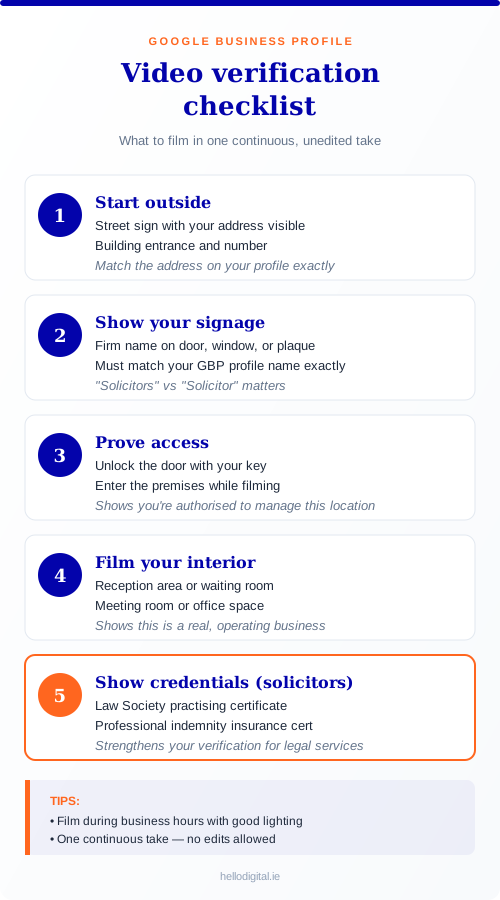
Video verification is now the default method for most new profiles in 2026. You'll record a short, unedited video (typically under two minutes) showing:
Exterior: Street signs, building numbers, and landmarks that confirm your address
Signage: Business signage matching the name on your profile
Interior: Your workspace, reception area, or office
Access: Proof you can access the premises (unlocking the door, for example)
Business materials: Licences, certificates, or branded materials
Record everything in one continuous take — no edits allowed. Make sure your Eircode is visible on any documents you show, and that your firm name on signage matches your profile exactly.
Tips for Irish solicitors filming video verification:
Film during business hours with good lighting
Start outside showing your street address and building entrance
Include your Law Society certificate or practising certificate in the shot
Show your reception or meeting room
Keep the video steady (use a tripod or ask someone to help)
Other verification methods
Depending on your circumstances, Google may offer alternatives:
Phone or SMS: A code sent to your business landline or mobile
Email: A code sent to an email address matching your website domain
Instant verification: Available if your website is already verified in Google Search Console
Postcard: Rarely offered now, but still possible as a fallback — a code mailed to your business address within 5-14 days
Important: Don't change your business name or address while verification is pending — this can restart the process or cause rejection.
Essential profile information
Once verified, focus on completing every section of your profile. Incomplete profiles rank lower in local search results.
Use your official firm name exactly as it appears on the Law Society register and your office signage. Don't add keywords or location names to your business name—this violates Google's guidelines and can result in suspension.
Correct: Murphy & Associates Solicitors
Incorrect: Murphy & Associates Solicitors - Conveyancing Dublin - Family Law
Categories tell Google what services you offer and which searches should trigger your listing.
Primary category: Select "Solicitor" as your main category. This is the most important choice and should reflect your core business.
Secondary categories: Add categories for your practice areas. Google uses American legal terminology, so you'll need to find the closest matches:
|
Your Practice Area |
Google Category to Use |
|---|---|
|
Conveyancing |
Real Estate Attorney |
|
Family Law |
Family Law Attorney |
|
Employment Law |
Labor & Employment Attorney |
|
Personal Injury |
Personal Injury Attorney |
|
Wills & Probate |
Estate Planning Attorney |
|
Commercial Law |
Business Lawyer |
|
Criminal Defence |
Criminal Justice Attorney |
|
Immigration |
Immigration Attorney |
Add all categories that genuinely apply to your firm, but don't add categories for services you don't actively offer.
Note that Irish clients search for 'solicitor' rather than 'attorney' or 'lawyer.' While you must use Google's American category names, your profile description and website should use Irish terminology.
Enter your complete business address exactly as you want it to appear. Use a consistent format and include your Eircode.
If you work from multiple locations, you can create a separate GBP listing for each physical office where clients can visit. Don't create multiple listings for the same address.
If you don't have an office where clients visit (purely remote practice), you may qualify for a Service Area Business listing instead—but this is less common for solicitors.
Use a local phone number rather than a mobile if possible. The number should connect directly to your firm, not a call answering service with a different business name.
Ensure this same phone number appears on your website and all other online listings. Consistency matters for local SEO.
Use your landline with the Dublin 01 prefix rather than a mobile number — it reinforces your Dublin presence and appears more established to potential clients.
Link to your main website homepage, or to a location-specific page if you have multiple offices with separate GBP listings.
Set accurate opening hours for when clients can contact you or visit. Include:
Regular weekday hours
Any Saturday availability
Closed on Sundays and bank holidays (if applicable)
Update hours for bank holidays in advance. Google prompts you to confirm or update hours before major holidays.
If you offer emergency or out-of-hours contact for certain matters, mention this in your business description rather than extending your listed hours.
Important: Your Google Business Profile works alongside your listings in Irish directories. Ensure your details match exactly across the Law Society of Ireland's Find a Solicitor directory, the Dublin Solicitors Bar Association, Golden Pages, and any local business directories like Dublin Chamber. Inconsistencies between these listings and your GBP can hurt your local rankings.
You have 750 characters to describe your firm. This description appears when people view your full profile. Use this space strategically:
Include:
Your main practice areas
Location and areas you serve (Dublin, specific suburbs, surrounding counties)
How long you've been established
What makes your firm distinctive
The types of clients you help
Avoid:
Promotional language like "best" or "leading"
Pricing information (this changes and isn't allowed)
Links or HTML
All caps or excessive punctuation
Example description:
"Murphy & Associates Solicitors has provided legal services to individuals and businesses in Dublin for over 25 years. Our team advises on residential and commercial conveyancing, family law matters including divorce and separation, employment disputes, and wills and probate. Based in Dublin 4, we serve clients throughout Dublin and surrounding areas. We offer clear, practical advice and keep you informed at every stage. Contact us to arrange an initial consultation to discuss your legal needs."
Your description should reflect genuine expertise — this ties into E-E-A-T signals that Google uses to evaluate legal websites.
Profiles with photos receive significantly more engagement than those without. Google reports that businesses with photos receive 42% more requests for directions and 35% more website clicks.
Photos to upload:
|
Photo Type |
What to Include |
Why It Matters |
|---|---|---|
|
Logo |
Your firm logo, square format |
Appears in search results |
|
Cover photo |
Office exterior or professional team shot |
First impression |
|
Exterior |
Street view of your building entrance |
Helps clients find you |
|
Interior |
Reception area, meeting rooms |
Shows professionalism |
|
Team |
Solicitors and staff (with permission) |
Builds personal connection |
Photo specifications:
Format: JPG or PNG
Size: Between 10KB and 5MB
Resolution: Minimum 720px wide
Orientation: Business photos work best in landscape
Avoid stock photos—they're obvious and undermine trust. Professional photographs are worth the investment, but well-lit smartphone photos are better than no photos.
Update photos periodically. If your office has been refurbished or your team has changed, update the images.
Google allows you to list specific services with descriptions. Add all relevant services your firm offers:
For each service, you can include:
Service name (e.g., "Residential Conveyancing")
Description (brief explanation of what's involved)
Price (optional—most solicitors leave this blank as fees vary)
Structuring your services helps Google understand what you offer and can improve visibility for specific service searches. If you'd prefer professional help with this, see our SEO services for solicitors.
Attributes are specific features of your business. Select all that apply:
Wheelchair accessible entrance
Wheelchair accessible parking
Identifies as women-owned (if applicable)
Identifies as veteran-owned (if applicable)
Online appointments available
Languages spoken
These attributes can help your listing appear for filtered searches and provide useful information to potential clients.
Reviews are one of the most important factors in local search rankings and have a significant impact on whether potential clients choose to contact you.
Firms with more positive reviews appear higher in local results
Star ratings display prominently in search results
Potential clients read reviews before making contact
Reviews provide fresh, relevant content about your services
Ask at the right time: Request reviews when a matter concludes successfully and the client is satisfied. For conveyancing, this might be on completion day. For litigation, after a favourable outcome.
Irish clients are often less accustomed to leaving online reviews than in other markets, so a personal request carries more weight. A brief email after completion, or a mention during your final call, works better than automated review requests.
Make it easy: Create a direct link to your Google review page:
Use a simple request: Keep your ask straightforward. For example:
"Thank you for choosing Murphy & Associates for your conveyancing. If you were happy with our service, we'd be grateful if you could leave a brief review on Google—it helps other people find us. Here's the direct link: [link]"
Consider timing for sensitive matters: For family law or other emotionally difficult cases, a review request may not be appropriate. Use professional judgment.
Never offer incentives (discounts, gifts) for reviews—this violates Google's policies
Don't ask for reviews from people who weren't clients
Avoid review generation services that create fake reviews
Don't ask clients to write specific things in their reviews
Respond to every review, positive and negative. Responses show you're engaged and care about client feedback.
Responding to positive reviews:
Keep it brief and genuine. Thank the reviewer and personalise slightly if possible.
"Thank you for taking the time to share your experience, Sarah. We're glad the conveyancing process went smoothly for you. Best wishes in your new home."
Responding to negative reviews:
This requires more care. Your response is public and potential clients will read it.
Respond promptly (within 48 hours)
Thank them for the feedback
Acknowledge their concerns without being defensive
Don't discuss case specifics or reveal confidential information
Offer to discuss offline
"Thank you for your feedback. We're sorry to hear your experience didn't meet expectations. Client satisfaction is important to us, and we'd welcome the opportunity to discuss your concerns directly. Please contact our office at [phone] so we can address this."
Never argue with reviewers publicly. Even if the criticism seems unfair, a defensive response reflects poorly on your firm.
If you receive a review that violates Google's policies (from someone who wasn't a client, contains offensive content, or is clearly fake), you can flag it for removal:
Find the review on your GBP listing
Click the three dots next to the review
Select "Flag as inappropriate"
Choose the reason and submit
Google doesn't remove reviews simply because they're negative—only if they violate policies. The review process can take several days.
Your GBP needs ongoing attention to perform well. This is also where AI tools can help with SEO — streamlining monitoring and updates.
Weekly:
Check for and respond to new reviews
Monitor Q&A for new questions
Monthly:
Review insights data
Add a post (see below)
Check all information is still accurate
Quarterly:
Update photos if needed
Review and refresh your business description
Add any new services
As needed:
Update hours for holidays
Respond to Google's suggested edits (verify accuracy before accepting)
Add new team photos when staff change
Posts appear on your profile and can highlight news, offers, or useful information. They're an underused feature that can improve engagement.
Types of posts:
Updates (general news or information)
Events (seminars, webinars, open days)
Offers (if you run any promotions)
Post ideas for solicitors:
Changes in law that affect clients (e.g., property tax updates)
New team members joining
Community involvement or sponsorships
Seasonal reminders (e.g., "Making a will before year end")
Office closure notices for holidays
Posts expire after seven days (except events, which expire after the event date), so regular posting keeps your profile fresh.
Anyone can ask questions on your GBP listing, and anyone can answer—including people who aren't associated with your firm. Monitor this section and answer questions yourself to ensure accuracy.
Proactively add FAQs: You can ask and answer your own questions to populate this section with helpful information:
"Do you offer free initial consultations?"
"What areas of Dublin do you serve?"
"Do you handle legal aid cases?"
"Is parking available at your office?"
"Do you serve clients outside Dublin?"
"Is there parking near your office?" (particularly relevant for Dublin city centre firms)
"Can I meet you outside office hours?"
"Do you offer consultations in Irish?"
This improves your profile's usefulness and can address common queries before people need to phone.
GBP provides data about how people find and interact with your listing:
Key metrics to monitor:
|
Metric |
What It Tells You |
|---|---|
|
Search queries |
What people searched to find you |
|
Views |
How many people saw your listing |
|
Direction requests |
How many people asked for directions |
|
Phone calls |
Calls made directly from your listing |
|
Website clicks |
Clicks through to your website |
|
Photo views |
How often your photos are viewed |
Review these monthly to understand what's working. If phone calls are low but views are high, your listing might need better information or more compelling photos.
Adding keywords to your business name violates Google's guidelines and risks suspension.
Wrong: "Dublin Conveyancing Solicitors - Best Family Law - Murphy & Associates"
Right: "Murphy & Associates Solicitors"
Your name, address, and phone number should be identical everywhere online. Even small differences (St. vs Street, different phone numbers) can hurt your local SEO.
Not responding to reviews—especially negative ones—suggests you don't care about client feedback. Always respond professionally.
Outdated opening hours, old phone numbers, or photos of an office you've moved from all damage trust and rankings. Keep everything current.
Multiple listings for the same location confuse Google and dilute your reviews. If duplicates exist, request removal of the incorrect ones through GBP support.
Google requires a real address where you conduct business and can receive clients. Virtual office addresses often get flagged and removed.
Video verification rejections are common. Usual reasons include:
Video was edited or not recorded in one continuous take
Signage didn't match your profile name exactly
Address wasn't clearly visible (no street sign or building number shown)
Video quality was too poor (bad lighting, shaky footage)
You didn't show proof of access (unlocking door, accessing workspace)
To fix, review Google's feedback, re-record addressing the specific issues, and resubmit. Make sure your firm name on any signage matches your GBP profile exactly — even small differences like "Solicitors" vs "Solicitor" can cause rejection.
Suspensions usually result from guideline violations. Common causes:
Keywords in business name
Address issues (virtual office, ineligible location)
Multiple listings for same business
Suspected fake reviews
To appeal, go to your GBP dashboard, click "Learn more" on the suspension notice, and follow the reinstatement process. Be honest about any issues and confirm you've fixed them.
Google sometimes accepts suggested edits from users without your approval. Check your listing regularly for unexpected changes. If someone has made incorrect edits, correct them through your dashboard.
If you believe someone is maliciously editing your listing, ensure your ownership is verified and report the issue through GBP support.
New or recently verified listings can take a few weeks to appear prominently. If your listing isn't appearing after a month:
Ensure all information is complete
Check your address is verified
Add photos and posts
Start building reviews
Ensure your website mentions your address and links to your GBP
Each physical office location where clients can visit should have its own GBP listing. Manage them all from one account but optimise each individually with location-specific photos, descriptions, and reviews.
Use this checklist to ensure you've covered everything:
Initial Setup
Claimed or created listing at business.google.com
Verified ownership (postcard received and code entered)
Business name matches official firm name exactly
Selected "Solicitor" as primary category
Added secondary categories for practice areas
Entered complete address with Eircode
Added phone number (same as website)
Added website URL
Optimisation
Written 750-character business description
Uploaded logo (square format)
Uploaded cover photo
Uploaded exterior photo (street view)
Uploaded interior photos (reception, meeting room)
Uploaded team photos
Added all services offered
Selected relevant attributes
Set accurate opening hours
Reviews
Created direct review link
Process in place to request reviews from satisfied clients
Responding to all reviews within 48 hours
Ongoing Management
Monthly check of all information
Regular posts (at least monthly)
Q&A section populated with common questions
Insights reviewed monthly
Hours updated for holidays
Go to business.google.com, search for your firm, and click "Claim this business." You'll need to verify ownership, most likely through video verification where you film your office, signage, and proof of access. The review process typically takes up to five business days.
Select "Solicitor" as your primary category. Add secondary categories for your practice areas using Google's American terminology — for example, "Real Estate Attorney" for conveyancing or "Family Law Attorney" for family law. Irish clients search for "solicitor," so use that term in your description and website even though the categories use American terms.
Video verification reviews typically take up to five business days. Phone and email verification (if offered) are usually instant. The rarely-offered postcard method takes 5-14 days. Don't change your business details while verification is pending.
Film in one continuous, unedited take showing: your street address and building entrance, business signage matching your profile name exactly, your interior workspace or reception, and proof of access (unlocking the door). For solicitors, including your Law Society practising certificate in the shot helps establish legitimacy.
Yes, but only if you have multiple physical office locations where clients can visit. Each office gets its own listing. Don't create multiple listings for the same address — this violates Google's guidelines and can result in suspension.
Ask satisfied clients directly at the conclusion of their matter. Make it easy by sending them a direct link to your Google review page. Irish clients are often less accustomed to leaving online reviews, so a personal request carries more weight than automated emails. Never offer incentives for reviews — this violates Google's policies.
Yes, always respond professionally within 48 hours. Acknowledge the concern, avoid being defensive, don't reveal confidential client information, and offer to discuss offline. Potential clients will read your response and judge your firm by how you handle criticism.
New listings can take a few weeks to appear. Ensure your profile is fully verified, all information is complete, you've added photos, and your address matches your website exactly. Building reviews also helps visibility. Check that your Eircode is correct — inconsistent address formatting can hurt rankings.
You need a physical address where clients can visit. If your firm serves Dublin clients but is based in a surrounding county, you can still appear in Dublin searches by setting your service area. However, a Dublin address will rank better for "solicitor Dublin" searches specifically.
Check for new reviews weekly. Update posts and review insights monthly. Verify all information quarterly. Update opening hours before bank holidays. Google favours active profiles, so regular engagement helps your visibility.
Your Google Business Profile is one part of a broader local SEO strategy. For a complete guide to SEO for solicitors, including keyword strategy, website optimisation, and content planning, see our comprehensive guide: SEO for Solicitors: The Complete Guide for Irish Law Firms.
If you'd like help optimising your firm's online presence, get in touch for a free consultation.
Alessandro Boscolo Conway — Hello Digital
I'm a Dublin-based freelance SEO and digital marketing consultant with over 20 years of experience, including time on Google Ireland’s Search Quality team.
I run Hello Digital, a consultancy that helps startups and small businesses across Ireland grow online through clear strategy, expert delivery, and practical support.
I've worked with over 50 Irish companies to improve their visibility, generate better leads, and grow sustainably through SEO and digital marketing.
I'm a certified Google Partner and a trusted advisor to e-commerce brands, local services, and fast-growing startups.
- Based in Dublin, 20+ years of experience
- Former Googler, certified Google Partner, SEO strategist, and performance marketer
- Trusted by 50+ Irish startups, e-commerce brands, and local businesses
- Learn more about Hello Digital